
If you want a professional listing site that looks and behaves like Yelp, Yellow Pages, or a niche marketplace — but without hiring an expensive developer — an all-in-one directory platform is the fastest way to get there. Brilliant Directories bundles CMS, CRM, membership payments, lead generation, email marketing, and integrations into a single product designed for local directories and membership communities.
Table of Contents
- Why use a purpose-built directory platform?
- What Brilliant Directories includes and which tier to choose
- Quick MVP setup: pick a niche, let the onboarding create an initial site
- Populate your directory quickly with Google Maps imports
- Membership plans and monetization models that actually work
- Member profiles and controls: what to show and when
- Page builder and content editing: expectations and practices
- Creating blog content and using built-in AI to scale copy
- Automations, webhooks, and Zapier: routing data to your stack
- Lead management and selling leads: a step-by-step flow
- Email newsletters, templates, and AI-generated emails
- Operational checklist before launching
- Growth playbook: how to get traction and revenue in months one through six
- Common pitfalls and realistic expectations
- When to upgrade tiers
- AppSumo lifetime deals and important limits
- Final advice: test pricing quickly and focus on conversion metrics
- Launch checklist recap
- Frequently asked questions
Why use a purpose-built directory platform?
General website builders and WordPress plus plugins can work, but they require piecing together multiple tools, ongoing plugin maintenance, and technical troubleshooting. A directory-focused platform gives you features that are built to work together from day one:
- Recurring revenue models via tiered memberships, annual plans, and pay-per-lead.
- Built-in lead capture and sales flows so listings can be monetized directly (businesses buy leads, upgrades, and add-ons).
- SEO-friendly structures specifically for directories so listings can rank in local search.
- Member management and dashboards so business owners can claim, edit, and promote their profiles.
- Automations and integrations for email, Zapier, webhooks, and developer access when you need deeper workflows.
What Brilliant Directories includes and which tier to choose
Brilliant Directories is an all-in-one CMS and CRM built for membership sites and directories. The AppSumo lifetime deal popularized in marketplaces often has tiered options with feature differences you should understand before buying.
- Tier 1: Good for testing — typically allows one lifetime website, around 250 members, and 50 instant business records. Basic features are available, but some advanced tools are locked (for example, click-to-call and pay-per-post may be restricted).
- Tier 3: The sweet spot for most operators. Unlocks features such as claimable listings, reply-to-reviews, private member chat, and many monetization options. Also provides a significant promo code for future purchases.
- Tier 5: Full access. Developer tools, Zapier and webhook support, API keys, ChatGPT content generation, and a stock photo library are included. Choose this if you want advanced automations, developer access, or native AI generation inside the platform.
For most businesses launching a monetized directory, Tier 3 is recommended. It unlocks the features that directly impact member experience and the ability to monetize effectively. Upgrade to Tier 5 when you need API, Zapier, and webhooks or want the built-in ChatGPT content creator and stock library.
Quick MVP setup: pick a niche, let the onboarding create an initial site
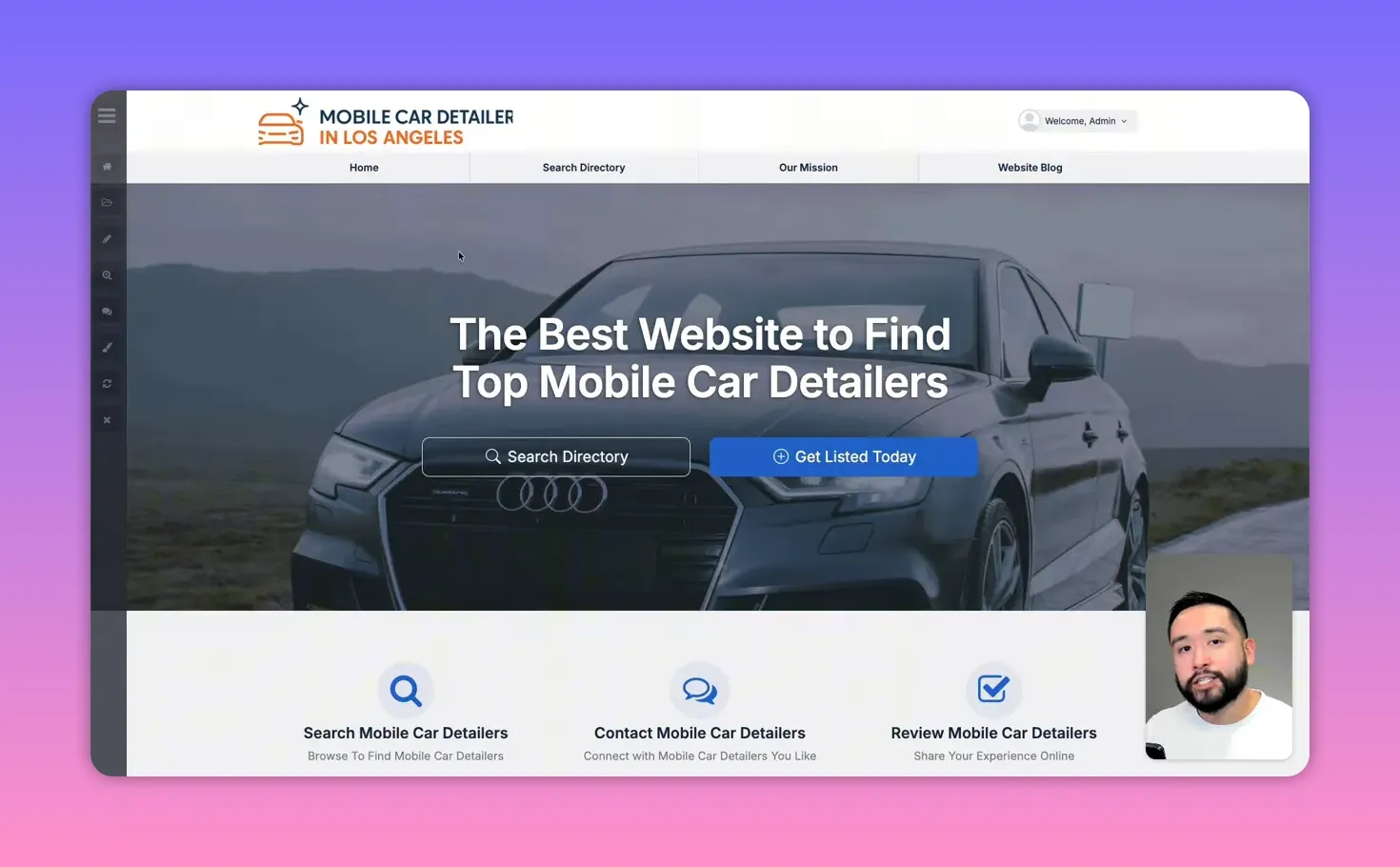
One of the fastest ways to go from zero to a usable directory is to focus on a tight niche and let the onboarding process create an MVP site structure. For example, a mobile car detailing directory in a single city makes it easy to target local search and onboard initial businesses quickly.
During setup the platform can generate an AI logo, a home page, and pre-populated content tailored to your niche. Logos sometimes need adjustment because automated generation can crop parts of the image. Expect a little manual cleanup but appreciate how much of the scaffolding the system builds for you.
Populate your directory quickly with Google Maps imports
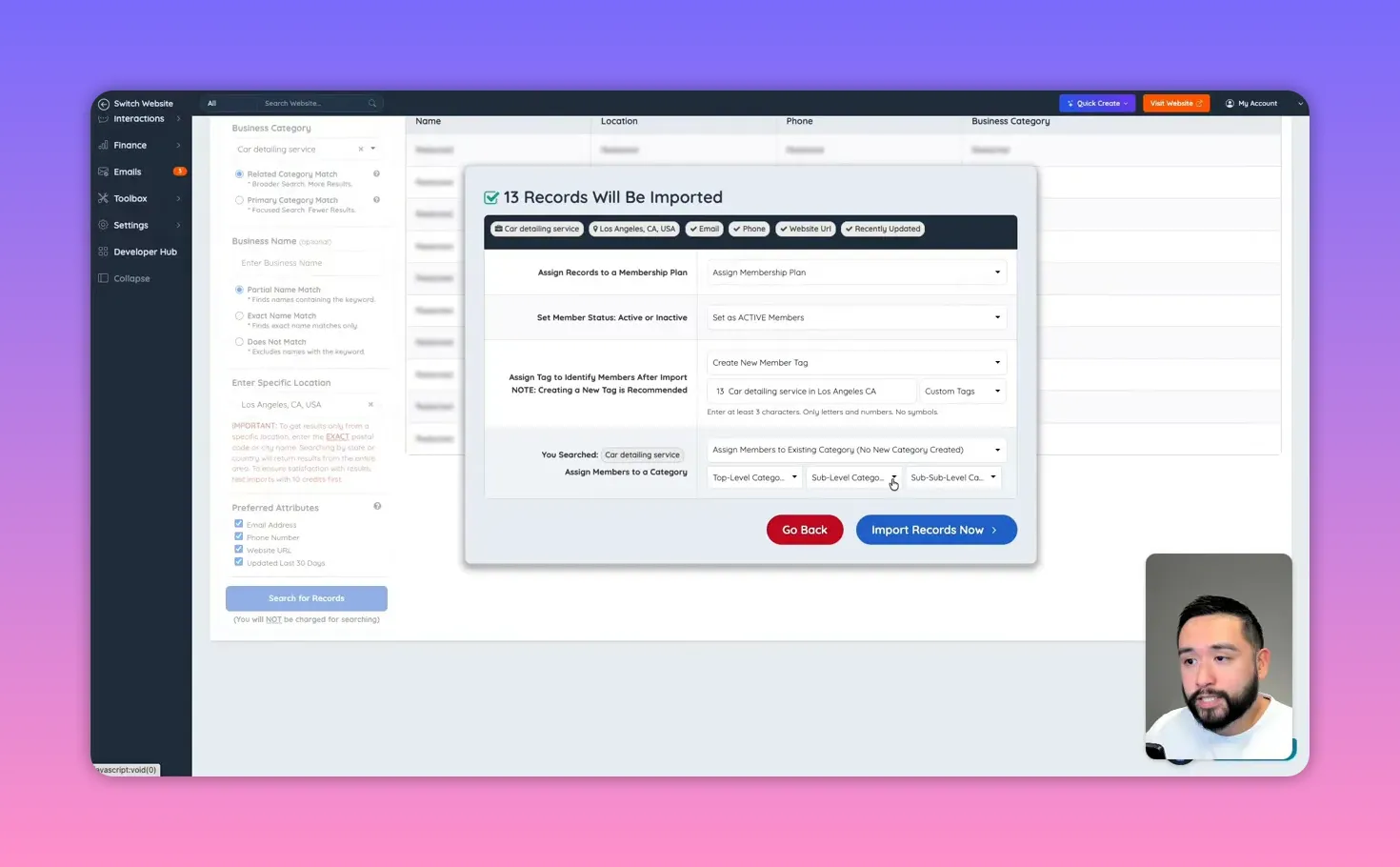
Empty directories look dead. You can solve that immediately by importing real businesses from Google Maps into your site. The platform offers a business import tool that searches by category and location and can filter by business attributes (email, phone, website, and recently updated entries). This produces listings with contact info and map coordinates so your directory looks useful from day one.
Tips for importing:
- Select a narrow category and geographic area to preserve relevance.
- Require email or phone if you plan to sell leads — the more complete the listing, the higher the conversion for buyers.
- Audit imported data and remove duplicates or outdated entries before launching widely.
Membership plans and monetization models that actually work
Monetization is the heart of a profitable directory. Brilliant Directories supports layered membership plans and several revenue streams that you can combine and test:
- Subscription plans: Monthly and annual tiers with varying limits and features. Offer a free tier to attract listings and upsell to paid plans that include extra visibility and marketing tools.
- Pay-per-lead: Capture inbound customer inquiries as leads and sell them to businesses. This model works well for high-intent local services like plumbing, detailing, or home improvement.
- Paid posts and promoted content: Allow members to publish featured posts, coupons, event listings, or job postings for a fee.
- One-time setup fees: Charge a setup or listing optimization fee to add value and offset initial onboarding work.
- Affiliate offers: Present a business toolkit within member dashboards that links to popular business tools. Add your affiliate links and earn commissions when members purchase recommended services.
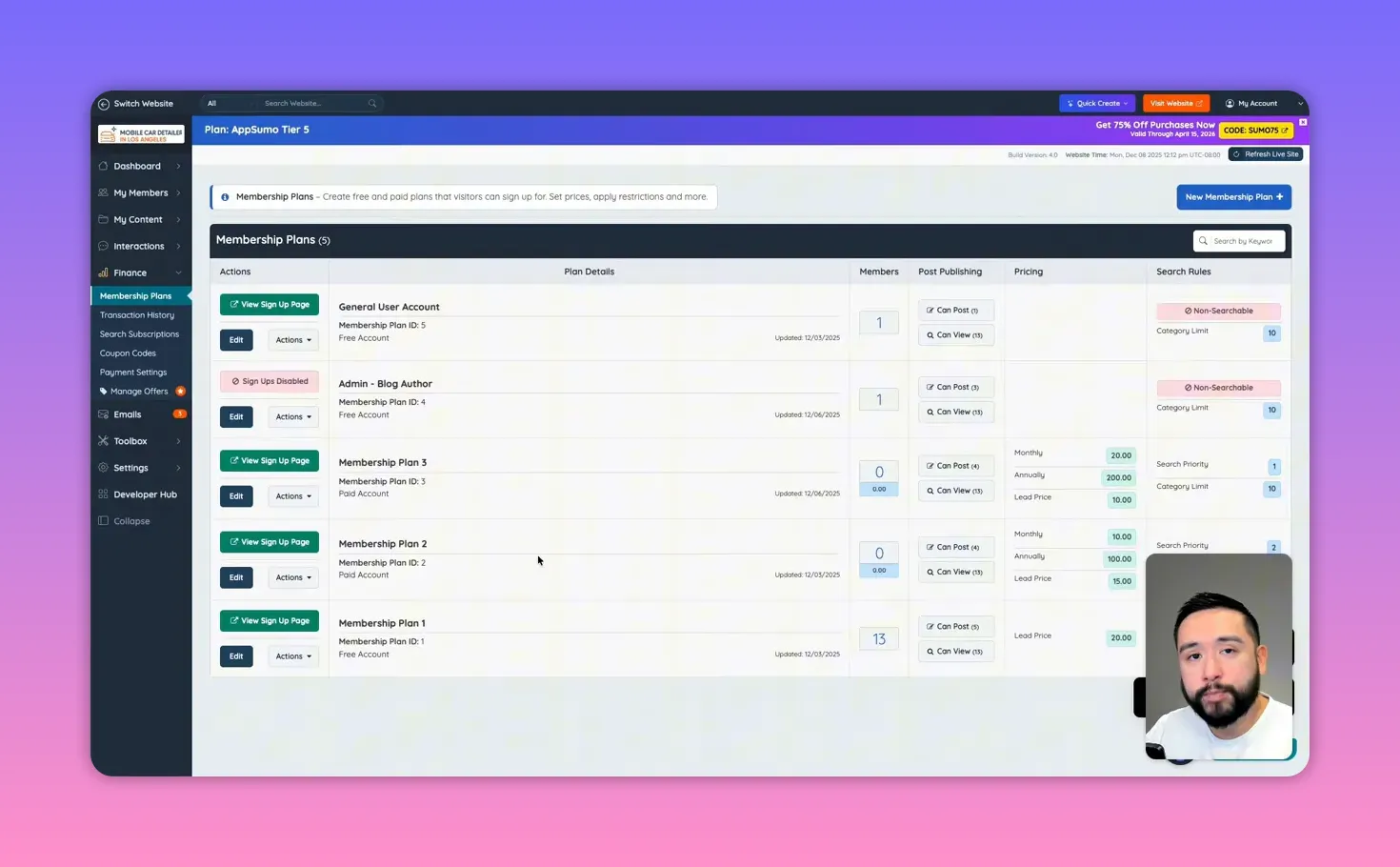
Example pricing configuration:
- Free plan: Basic listing. Pay-per-lead at $20. Great for getting businesses on the site quickly.
- Pro monthly: $10/month, lead price $15. Lower lead price incentivizes subscription upgrades.
- Business monthly: $20/month (or $200 annually), lead price $10. Provide extras like private messaging, photos, priority placement, and the ability to respond to reviews.
Use coupons and timed discounts to convert early adopters, and tie membership tiers to posting privileges, number of photos, featured positions, and lead pricing.
Member profiles and controls: what to show and when
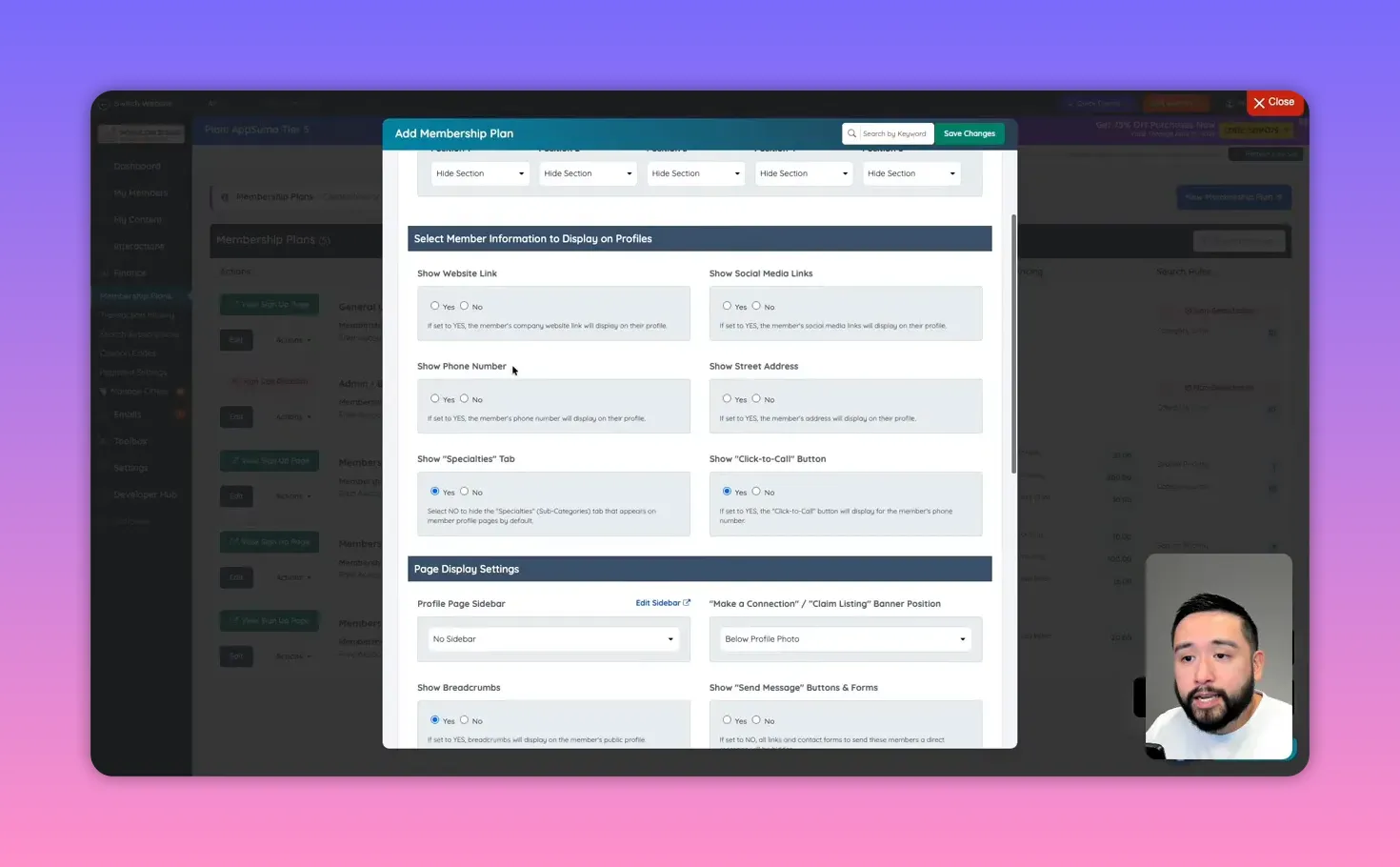
Member profile pages are core conversion points. Decide what information you expose publicly and what remains visible only to logged-in members. Typical profile elements that help conversions include:
- Business name, address, and a Google Maps embed for directions
- Phone number with click-to-call (available in certain tiers)
- Website and social links
- Photo gallery, service list, and pricing snippets
- Reviews and the ability for owners to reply (makes listings feel more trustworthy)
- Private messaging or chat options for immediate contact
Control which membership tiers can see or edit specific profile elements. For example, only paid tiers might have the ability to post coupons, create photo albums, upload products, or publish video.
Page builder and content editing: expectations and practices
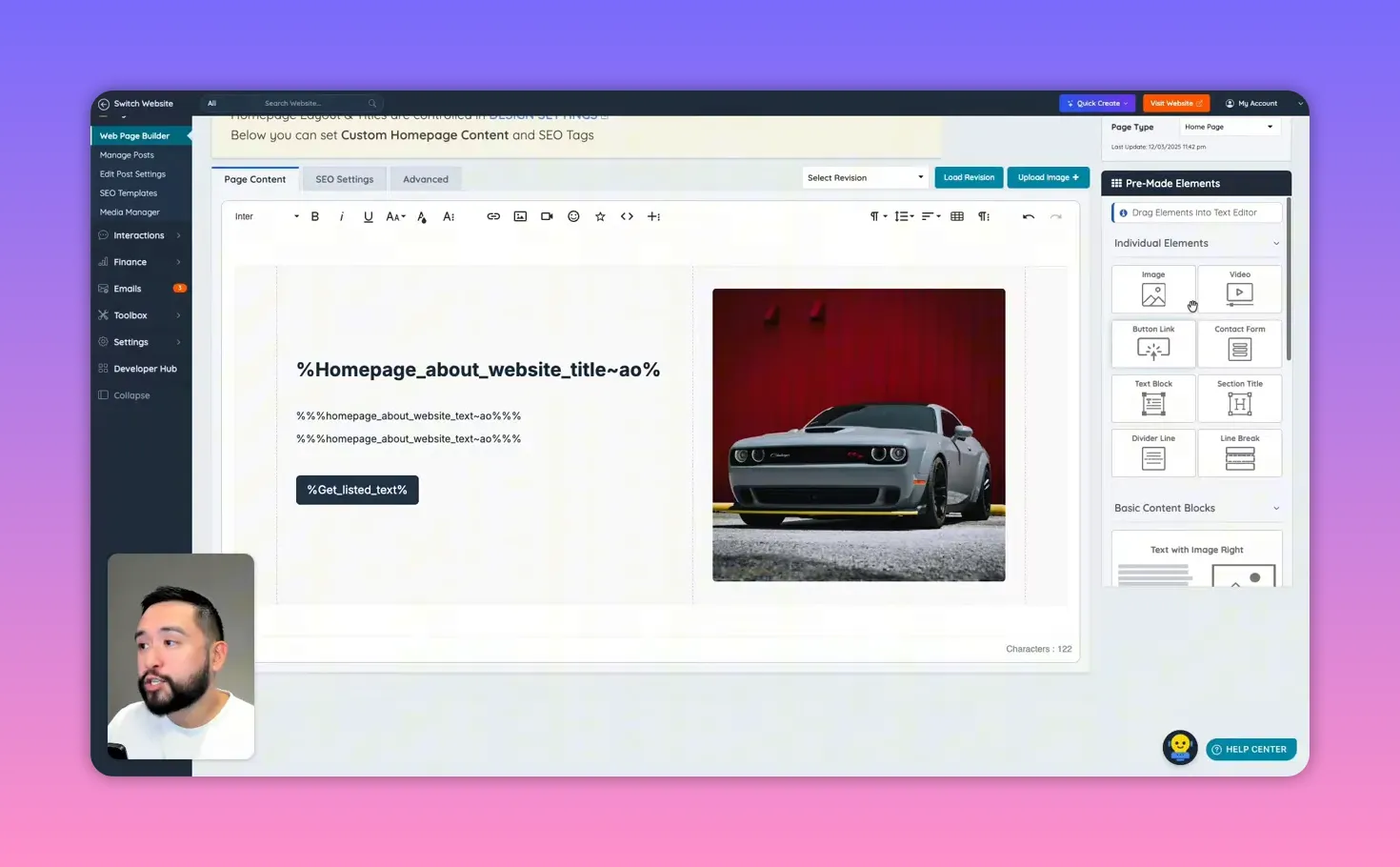
The site builder provides pre-created pages such as the homepage, pricing, about, contact, and legal pages. Editing uses a block-based or element-driven editor. It is powerful but not as slick as some modern drag-and-drop SaaS website builders. Expect a learning curve when rearranging content, managing spacing, or customizing layouts.
Key page editing tips:
- Work from top to bottom when editing to avoid confusion with block placements.
- Use the stock photo library for high-quality header images if your tier includes it.
- Check page-level SEO settings, meta tags, and open graph settings for social sharing.
- Place essential calls to action above the fold: Join, Claim Listing, Purchase Lead.
Creating blog content and using built-in AI to scale copy
Content drives search traffic. The platform includes a full blogging system and, at higher tiers, a ChatGPT content creator integrated directly into the editor. Use it to generate drafts, outlines, and meta descriptions quickly. The AI tool functions like a chat assistant: give a prompt such as “Write a 200-word blog article about the benefits of car detailing” and refine the result before publishing.
How to use blog posts strategically:
- Target local long-tail keywords: “mobile car detailing Los Angeles”, “best car detailer near me”.
- Create service pages that address customer intent and link to relevant listings.
- Encourage members to publish articles or promotions to increase local content volume.
- Use blog posts to educate customers on what makes a good local service and why they should contact multiple providers through your site.
Automations, webhooks, and Zapier: routing data to your stack
One of the most valuable capabilities is piping data out of the directory into the rest of your business systems. Native Zapier integration and webhook support allow you to push form submissions, new leads, new users, and more into CRMs, email platforms, or funnels.
Examples of integration workflows:
- When a contact form is submitted, send the lead into your email marketing platform and create a follow-up automation.
- When a new member signs up, add them to a nurturing sequence that explains how to optimize their listing.
- When a membership cancels, send an exit survey and offer a reactivation coupon.
Webhooks expose a long list of events with payloads that include form fields, IPs, form IDs, and more. Use these to build precise automations or to push data into a custom CRM for better lead scoring.
Lead management and selling leads: a step-by-step flow
Pay-per-lead is a high-margin model for directories. Here is a typical lead flow you can implement:
- Customer finds a listing and fills out a contact form on the listing page.
- The submission shows up in the platform’s “Manage Leads” view, where the lead is stored and timestamped.
- Business owners can view leads in their dashboard and choose to purchase the lead for a set fee (for example, $20 per lead for free-tier listings).
- Once a business purchases a lead, they receive the contact details and can follow up directly.
- Track conversions and returns to refine lead pricing and quality filters.
This flow puts you between customers and businesses, creating recurring transaction revenue. Ensure leads are real by confirming phone numbers or emails and by filtering imports for recently updated listings.
Email newsletters, templates, and AI-generated emails
Email is built into the platform, including templates, newsletter sending, and an editor that supports ChatGPT-generated copy at higher tiers. Use email to:
- Welcome new members and show them how to optimize listings.
- Promote seasonal offers or featured listings.
- Send leads and performance reports to paid members to demonstrate value.
- Run re-engagement sequences for dormant members or lapsed leads.
Operational checklist before launching
Before you promote your site publicly, complete this checklist to ensure a polished launch:
- Populate the directory with at least 50 high-quality listings relevant to your launch city or niche.
- Set up three membership tiers and clear feature differences between them.
- Create legal pages: privacy policy, terms of use, and any lead disclaimers.
- Connect a custom domain, set up SSL, and verify site speed and responsiveness on mobile and desktop.
- Configure email sending to avoid spam filters and add SPF/DKIM where possible.
- Enable Zapier or webhooks for lead routing to your CRM and autoresponders.
- Create at least 5 SEO-focused blog posts and 10 internal content pages targeting local keywords.
- Seed the site with testimonials and at least a few reviews to build trust.
Growth playbook: how to get traction and revenue in months one through six
A solid launch is only half the battle. A practical growth plan focuses on both supply (business listings) and demand (customers searching for services):
Month 1: Local outreach and data seeding
- Import listings and claim local businesses personally, offering a free premium trial in exchange for publishing their first promotion.
- Cold email or call top local businesses to explain the benefits of your directory and offer an onboarding discount.
- Run a handful of paid local ads targeting specific service keywords; push the traffic to your directory landing pages.
Months 2–3: Content, partnerships, and trials
- Publish targeted blog posts and local neighborhood guides that link to listings.
- Partner with local chambers of commerce, co-working spaces, and industry meetups to promote the directory.
- Refine lead pricing by analyzing purchase rates and lead-to-customer conversion for businesses.
Months 4–6: Scale and automation
- Automate lead routing to CRMs and nurture buyers and sellers with drip sequences.
- Introduce paid features like featured placement, promoted posts, or premium photo galleries.
- Expand to adjacent neighborhoods or verticals after proof of concept in one niche.
Common pitfalls and realistic expectations
There are tradeoffs. The platform is powerful but it can feel dated in the page editor UX compared to modern no-code landing builders. Expect time to learn the editor quirks, fine-tune spacing, and correct AI-generated logos. Simpler tasks like moving blocks or removing table-like elements can require trial and error. Plan for an initial ramp where you refine templates and standard operating procedures.
Also avoid aggressive scraping or importing without confirmation; you want good, contactable businesses in your database if your revenue model relies on selling leads.
When to upgrade tiers
Upgrade decisions should be driven by need:
- Upgrade to Tier 3 when you want real monetization features like member replies to reviews, claimable listings, and private chat — these directly impact member value.
- Upgrade to Tier 5 when you need developer access, Zapier, webhooks, API keys, or the AI content generator to scale content and automations.
- If you only need a basic testing environment or a proof of concept, start on a lower tier and upgrade as you transition from MVP to revenue.
AppSumo lifetime deals and important limits
AppSumo lifetime deals can be a great way to acquire the platform at a steep discount. Typical deal terms include:
- One lifetime website per purchase.
- Tier-dependent limits on active members and instant business records (for example, 250 members and 50 records on a lower tier).
- Feature locks by tier — evaluate your monetization and integration needs before choosing.
Final advice: test pricing quickly and focus on conversion metrics
Start with simple pricing and iterate. The single most important metric for a directory is conversion from visitor to lead and then lead to sale for the businesses. Track the following:
- Monthly active listings and new registrations.
- Number of leads generated and the percentage purchased by businesses.
- Revenue per member by tier and average lifetime value.
- Churn rate for members on paid subscriptions.
Tweak lead pricing, trial length, and feature sets to find the sweet spot where businesses see value and renew. Use coupon codes and limited-time discounts to accelerate early signups and gather feedback for product improvements.
Launch checklist recap
- Choose a focused niche and city for launch.
- Populate the database with verified imports and encourage initial claiming by owners.
- Set up three membership tiers with clear benefits and a pay-per-lead option.
- Enable Zapier or webhooks to route leads to your CRM and automate follow-ups.
- Create initial blog content and local landing pages for SEO.
- Test lead purchases and measure conversion before scaling traffic spend.
Frequently asked questions
Is Brilliant Directories suitable for a local niche directory?
Yes. It is designed for local directories and niche membership sites. The platform includes listing pages, maps, member dashboards, and SEO-friendly structures that work well for focused local verticals like home services, health, or automotive.
How do I populate my site with listings quickly?
Use the Google Maps import tool to pull businesses by category and location. Apply attribute filters (phone, email, website, recently updated) to ensure you import listings with usable contact details. After import, audit for duplicates and clean up incomplete records.
Can I sell leads directly to businesses?
Yes. The platform has a lead management flow where customer inquiries become leads that business owners can view and purchase. You control the lead price by membership tier and can decline or accept leads on behalf of members depending on your policies.
What payment and integration options are available?
Payment options include recurring monthly and annual subscriptions and one-time payments for leads or posts. Integrations include Zapier (native in higher tiers), webhooks, and API access for advanced workflows. These let you push leads and form data into CRMs, autoresponders, and other tools.
Does the platform include email marketing?
Yes. There is a built-in newsletter system, email templates, and an editor. Higher tiers include ChatGPT integration to generate email copy and newsletter content quickly.
Is there a stock photo library and AI content tools?
Stock photo access and the ChatGPT content creator are available at higher tiers. The stock library pulls images from sources like Pexels and Unsplash, which is useful for improving the visual quality of listing pages and blog posts.
What are the main limitations of the platform?
The main limitations are the editing UX and learning curve for the page builder. Some manipulations feel less intuitive than modern visual builders. Also, AppSumo lifetime deals often limit the number of members or business records per tier, so evaluate those limits against your growth plan.
When should I upgrade to developer-level access?
Upgrade when you need API keys, access to the MySQL database, webhook management, or deep custom integrations. This becomes essential when you want automated, enterprise-level workflows or direct access to raw data for custom reporting.
How should I price leads and memberships initially?
Start conservatively: offer a free or low-cost listing to build inventory, then offer a clear upgrade path with benefits like reduced lead costs, priority placement, and content posting privileges. Typical lead prices vary by vertical, but testing price points like $10 to $25 per lead is a common approach. Monitor purchase rates and adjust.
Can businesses claim their listings and manage profiles?
Yes. Claimable listings are an important feature for trust and engagement. Claiming allows business owners to verify and edit their profiles, respond to reviews, and purchase promotions. This feature is typically available at mid-level tiers.
This article was created from the video How To Build a PROFITABLE Directory Site FAST! (AppSumo Deal) with the help of AI.