Table of Contents
- What Creatify Does and Why It Matters 🚀
- How Creatify Generates Ads — A Practical Look 🛠️
- Voiceovers, Scripts, and UGC Style 📣
- Testing Volume and Revisions Make the Difference 🔁
- Pricing, Plans, and What You Get 💳
- Pros and Cons — When Creatify Wins and When It Doesn’t ⚖️
- Performance: Does AI Beat Manual Creatives? 📊
- How to Use Creatify Effectively ✅
- FAQ ✨
- Final Thoughts 🧭
What Creatify Does and Why It Matters 🚀
I’m Ashley, and I’ve tested a lot of tools that promise to speed up ad creative. This creatify ai review focuses on what Creatify actually does day to day for e-commerce brands, agencies, and solo marketers who need fast, scroll-stopping short-form ads.
At its core, Creatify turns a product page or a short description into ready-to-run UGC-style video ads for TikTok, Facebook, Instagram, and similar platforms. That means it pulls product images, descriptions, pricing, and reviews, then auto-generates multiple short videos complete with scripts, voiceovers, captions, and platform-native formatting.

How Creatify Generates Ads — A Practical Look 🛠️
Feed Creatify a product URL and it scans the page for visuals and copy. From that, it generates several video concepts—different hooks, overlays, and voice styles—so you don’t have to start with a blank page. If you sell blue light glasses, for example, Creatify will build a handful of demo-style clips: a lifestyle hook, a problem-solution angle, and a quick how-to use clip.
Key components Creatify handles automatically:
- Script generation tailored to the product and audience
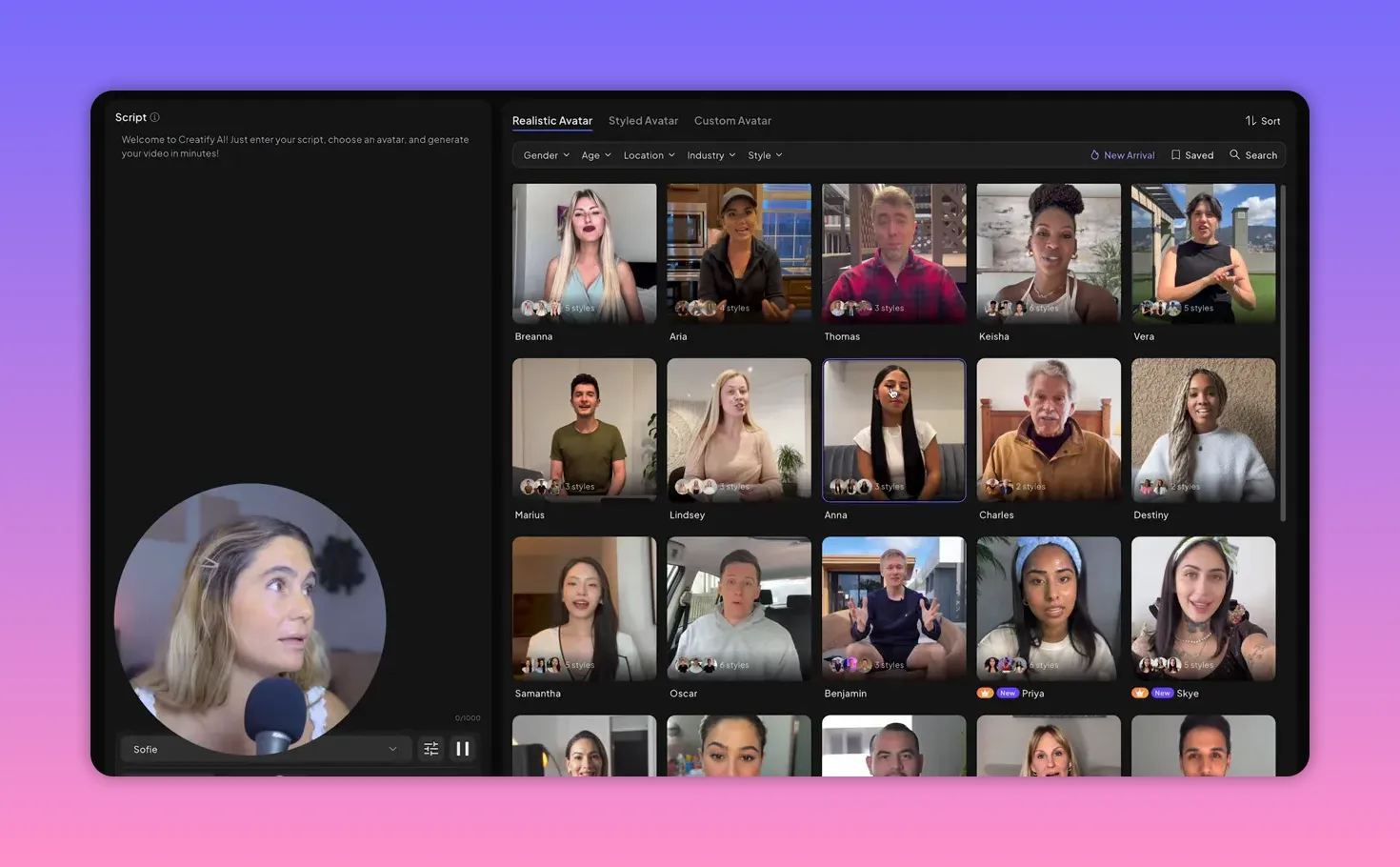
- Multiple voiceover styles and actor options
- UGC-native editing choices for TikTok, Reels, and Shorts
- Auto captions and text overlays
- Multiple ad variants for fast testing
Voiceovers, Scripts, and UGC Style 📣
One big time saver is the script and voiceover engine. Creatify writes the ad scripts based on the product and then produces narration in different tones: friendly, professional, or energetic TikTok style. There are male and female voices, accents, and actor-like deliveries so you can test tone without hiring talent.
The output is intentionally organic rather than glossy. That UGC look—lo-fi demos, natural pacing, short hooks—often outperforms ultra-polished ads on social platforms. If your goal is testing multiple angles quickly, that aesthetic is a major advantage.
Testing Volume and Revisions Make the Difference 🔁
Rather than betting a budget on one polished asset, Creatify is built for volume. Generate 5 to 10 variations, test them, and scale winners. Its speed is the primary advantage: what used to take days (script, casting, filming, editing) can now be done in an hour or less.
Pricing, Plans, and What You Get 💳
This creatify ai review covers the typical pricing tiers and who they make sense for:
- Free plan: 10 credits (~2 videos), watermarked exports, limited avatars and features—good for a quick trial.
- Starter (~$33/mo billed yearly): ~100 credits (~20 videos), no watermark, more aspect ratios, videos up to 2 minutes.
- Pro (~$69/mo billed yearly or $99 monthly): ~40 videos, full avatar library, create-your-own avatar, batch mode, up to 10-minute videos.
- Ad Max / Enterprise: unlimited credits, inspiration library, competitor tracker, A/B testing, priority support, and optional managed services.

For most e-commerce operators and agencies testing multiple products, the Starter or Pro plans offer the best balance between cost and output. If you need high-volume production and competitive intelligence, the enterprise-level options add value.
Pros and Cons — When Creatify Wins and When It Doesn’t ⚖️
Where Creatify shines:
- Speed: produce numerous ad variants in minutes.
- Beginner friendly: no editor, copywriter, or voice talent required.
- Testing-first approach: built to generate multiple hooks and formats quickly.
- Native UGC formats that match current platform best practices.
Where Creatify falls short:
- Limited customization for frame-level editing, transitions, and fonts.
- Voiceovers can sometimes feel slightly robotic or too polished.
- Not the best fit for luxury brands that need a high-end editorial aesthetic.
- Some manual tweaking is still needed to nail brand-specific voice or visual identity.
Performance: Does AI Beat Manual Creatives? 📊
Real-world experiments show Creatify can compete with and sometimes outperform manual UGC creatives. In one case study, AI-generated ads delivered lower costs: around 28 percent lower cost per result and 31 percent lower cost per click compared to the best manually produced UGC ad. That outcome is context dependent, but it illustrates that rapid testing plus volume often trumps a single handcrafted spot.
How to Use Creatify Effectively ✅
To get the most from Creatify:
- Start with a clear primary angle (problem, before/after, how-to).
- Generate multiple variants and prioritize quick A/B tests.
- Tweak overlays and regenerate variations until voice and visuals match your brand.
- Use Creatify as your high-volume testing engine, then produce a higher-end spot for long-term brand campaigns if needed.
FAQ ✨
Is Creatify suitable for small e-commerce shops?
Yes. Creatify is particularly useful for solopreneurs and small brands that need ads quickly without hiring a full creative team. The Starter plan gives enough monthly credits for routine testing.
Will Creatify replace professional editors and agencies?
Not entirely. Creatify excels at fast testing and volume. For high-end campaigns, custom storytelling, or luxury branding, traditional production still has a place.
How realistic are the voiceovers?
Voiceovers are high quality and vary by voice choice. Some voices sound slightly robotic in emotional nuance, so test multiple voices to find the best fit for your brand.
Can Creatify produce platform-specific formats?
Yes. Creatify outputs native formats for TikTok, Instagram Reels, Facebook, and YouTube Shorts and follows current best practices for short-form ads.
What’s the fastest way to see ROI with Creatify?
Use Creatify to generate many variations, run small-scale tests to find 1–2 winners, then scale the performing creatives. The speed of iteration is where the ROI shows up.
Final Thoughts 🧭
This creatify ai review shows Creatify is an excellent tool for teams that need high volumes of social-first ad creatives and rapid testing. It does a lot of the heavy lifting—script, captions, voiceovers, and native edits—and lets you focus budget on testing rather than production logistics. If your priority is speed and scalable testing, Creatify belongs in your toolkit. If your priority is handcrafted, editorial-level branding, pair Creatify with traditional production or reserve custom creative for flagship campaigns.