I used to dread the Monday pile: emails, six PDFs, two long YouTube explainers, and a slide deck. One evening I pasted a 45-minute video into Skimming AI and, within minutes, had a usable brief. This post walks through that experience, the AppSumo lifetime offer, the limits and perks of each tier, and why I think price skimming ideas sneak into how these deals are pitched.
1) Quick Take: What Skimming AI Actually Does
Skimming AI feels like an always-on research assistant I can talk to. Instead of reading a long PDF or rewatching a 45-minute video, I upload or link the source and ask questions. It works as an AI document summarizer, a YouTube summary tool, and a quick way to pull key points from audio, images, and websites.
What I can “chat with” (and why it matters)
- Documents (PDF, DOCX, CSV, PPT, OCR, and more)
- YouTube videos (paste a link, then ask for takeaways)
- Audio + video files (useful for podcasts, calls, trainings)
- Images (quick extraction and explanation)
- Websites + cloud links (so research isn’t stuck in one place)
What felt different to me is how fast it turns content into action items. I’m not just getting a generic summary—I can ask, “What are the steps?” or “What should I do next?” and move on.
Workflow helpers I actually noticed
Skimming AI supports 100+ languages and includes Group Chats so I can organize projects and chat across multiple files at once. It also mentions nested-source training, which is helpful when I want one “knowledge pile” built from related sources.
The Chrome extension expands the workflow: I can highlight text on a webpage and instantly summarize, explain, read it aloud, or translate it.
| Feature | Quick data |
|---|---|
| Languages | 100+ supported |
| Chrome extension | Summarize / Explain / Read aloud / Translate |
| AI models shown | GPT-4o Mini, Claude 3 Haiku, Gemini 1.5 Flash |
One practical note: advanced models are available, but on lower tiers they may use credits. My wild-card take: it’s like a librarian with superpowers—still imperfect and slightly opinionated, but a huge time-saver.
AppSumo: “60-day money-back guarantee”
2) AppSumo Pricing Tiers — Numbers, Limits, and a Table
Skimming AI is sold as an AppSumo lifetime deal, so I pay once and keep using it. This kind of lifetime access pricing follows common Lifetime founders pricing patterns on AppSumo: a few tiers, bigger limits as you move up, and a premium “unlimited” option for teams.
App pricing models: 4 lifetime-license tiers
- License Tier 1: $69
- License Tier 2: $119
- License Tier 3: $299
- License Tier 4: $589
All tiers include the same core feature set (Fast models + OpenAI/Claude/Gemini options, Chrome extension, 100+ languages, and support for PDFs, docs, spreadsheets, OCR, YouTube, audio/video, images, and cloud/website links). The real difference is monthly usage caps and team size.
Numbers and limits (side-by-side)
| Tier | Price | Docs/mo | Multimedia hrs/mo | Links/mo | Questions/mo | Users |
|---|---|---|---|---|---|---|
| 1 | $69 | 1,000 | 120 | 1,000 | 10,000 | 1 |
| 2 | $119 | 10,000 | 400 | 10,000 | Unlimited | 5 |
| 3 | $299 | 30,000 | 1,500 | 30,000 | Unlimited | 15 |
| 4 | $589 | Unlimited | Unlimited | Unlimited | Unlimited | Unlimited |
Credits note + who Tier 4 is for
On Tiers 1–3, advanced OpenAI/Anthropic models may use credits, creating a two-layer experience (cap + model credits). Tier 4 mirrors “price skimming” benefits for agencies: unlimited usage, unlimited users, and reportedly no credit costs for advanced models.
AppSumo: “60-day money-back guarantee”
3) How It Works: Formats, Models, and Speed
Upload options (AI document summarizer + more)
Skimming AI works like a chat layer on top of your content. I can upload files or paste links, then ask questions or request summaries. It’s flexible enough for content-heavy workflows because it supports many formats:
- YouTube summary tool: paste a YouTube link
- Audio: MP3, WAV, AAC, FLAC, OGG, M4A
- Video: MP4, AVI, MOV, MKV, WMV, FLV, WEBM
- Documents: PDF, DOC, DOCX, TXT, CSV, XLSX, EPUB, PPT, OCR
- Images: JPG, PNG, GIF, BMP, SVG, WEBP
- Web/cloud links: chat with websites and nested sources for more context
Skimming AI: “Chat with cloud links and nested sources for deeper context”
Cloud integrations like Google Drive, Dropbox, Notion, and Slack are listed as Coming Soon.
Model choice and App pricing models (credits)
When I add a source, I can pick an AI model such as GPT-4o Mini, Claude 3 Haiku, or Gemini 1.5 Flash. This is where App pricing models matter: on lower tiers, premium models (like GPT-4 or Claude 3 Opus) may use credits, which can change the real cost if I rely on top-tier outputs often. Tier 4 removes those credit costs for advanced models.
Speed benchmarks (what I saw)
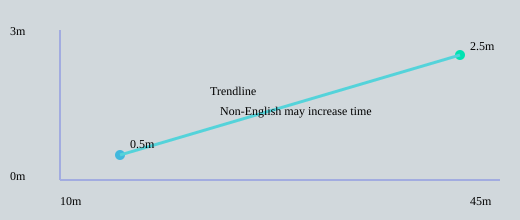
Processing is fast for English videos and scales with length. In the demo, a 10-minute English video took about 30 seconds, while a 45-minute video took about 2.5 minutes. Non-English content may take longer.
Chrome extension (quick summaries anywhere)
The Chrome extension felt simple: I highlight text on a page, and a popup lets me summarize, explain, read aloud, or translate in 100+ languages.
4) Use Cases, Real-World Notes, and a Quirky Anecdote
Use cases that actually match the “Price skimming strategy” vibe
Skimming AI feels built for content-heavy teams and early adopters who value speed over perfect fidelity. In a way, the lifetime deal mirrors a Price skimming strategy: higher upfront tiers unlock fewer limits, which can create Quick cash flow for the maker while rewarding power users who jump in early. For me, the best real-world fits are:
- Students crunching lecture videos into study notes
- Researchers skimming papers and extracting claims, methods, and limitations
- Agencies repurposing client webinars into briefs, posts, and scripts
- Marketers pulling quick creative briefs from websites, PDFs, and YouTube
My RobinReach test (and what it got right)
I tested it by summarizing a RobinReach YouTube video. It pulled out the combined tool stack (ChatGPT, Midjourney, Canva, Hootsuite) and even captured pricing examples mentioned in that demo ($69, $159, $359). It also surfaced the workflow themes accurately:
“AI content creation, post optimization, and content repurposing are core to our workflow”
It listed features like scheduling, analytics, and automations (Shopify, WordPress), which matched what I heard.
Real-world notes: speed wins, but watch the hidden costs
- Pros: big time savings, supports docs/video/audio/images, and Group Chats let me chat across multiple files for one theme.
- Cons: occasional summary inaccuracies, non-English videos can lag, and mid/low tiers can have credit surprises (example shown:
GPT-4 = 100 credits,Claude 3 Opus = 1 credit).
Processing time felt reasonable: a 45-minute video took about 2.5 minutes.
Quirky anecdote + tier instinct
I once turned a 45-minute webinar into a 2-slide brief and a 5-tweet thread in under 10 minutes—felt a bit like cheating, but it saved my Monday. For Early adopters pricing value, I’d start small teams at Tier 2, and push agencies/power users toward Tier 4 to avoid credit friction.
5) Pricing Strategy Angle: Why This Feels Like Price Skimming
When I look at Skimming AI’s AppSumo tiers ($69, $119, $299, $589), it reminds me of a classic Price skimming strategy: start high for the people who want the most value right now, then let lower tiers capture everyone else. Tier 4 is the “premium” anchor with unlimited documents, hours, links, and users—perfect for agencies and teams that value speed and scale more than the upfront cost.
“Price skimming is a high-to-low pricing strategy that captures early adopters willing to pay premium prices”
Lifetime founders pricing + Psychological pricing implementation
This deal also feels like Lifetime founders pricing, which is common for indie tools that want fast cash flow and early feedback. At the same time, the numbers show Psychological pricing implementation: $69 instead of $70, $119 instead of $120. Industry insights often cite charm pricing lifting conversions by roughly 3–7%, and these tiers follow that pattern.
Layered monetization that mirrors skimming tactics
Another “skimming-like” layer is how usage caps and model credits interact. All tiers include advanced models, but on Tier 1–3, some premium models can cost credits, while Tier 4 removes those credit costs. That creates a prestige path: pay more upfront to avoid friction later.
Pros, cons, and how I’d pick a tier
- Pros: quick cash flow, a loyal early user base, and a clear upgrade ladder.
- Cons: price-sensitive buyers may wait, and later competitors could undercut pricing.
- Estimate my baseline: documents/month, YouTube hours, and links.
- Check if I’ll hit Tier 1–3 caps and whether model credit costs matter.
- Decide my mindset: charm price savings (Tier 1/2) vs. prestige simplicity (Tier 4).
6) Recommendation, Wild Cards and Final Thoughts
My recommendation (based on Lifetime access pricing and real usage)
If you’re comparing Skimming AI tiers, I’d start with how much you actually process each week, not the feature list (because most features are included across tiers). For most solo pros, I’d try Tier 2 first. It gives me room to run regular document and YouTube workflows without feeling boxed in. For a mid-size team, Tier 3 is the safer middle ground because it supports more users and higher monthly limits. If I’m running an agency, publishing at high volume, or collaborating with many people, Tier 4 is the cleanest option because it’s unlimited and (as shown in the demo) it removes credit costs for advanced models—making it the simplest costing model for heavy use.
Since AppSumo includes a
AppSumo: “60-day money-back guarantee”
I’d treat that window as my testing period. Research-wise, testing with real content is the fastest way to validate tier choice, especially with lifetime deals where usage planning matters.
Wild cards: two ways I’d stretch Skimming AI
Wild card #1: I’d use Skimming AI like an editor-in-chief—auto-scan daily news, competitor posts, and niche blogs, then ask it to output five prioritized headlines that match my brand angle. With group chats and nested-source training, it could become a shared “briefing room” for a team.
Wild card #2: my analogy is a pressure cooker for insights. It’s fast and efficient, but I still need to taste and season—meaning I should quality-check summaries, especially for nuance and quotes.
Final checklist (Early adopters pricing sanity check)
Before I buy at Early adopters pricing, I estimate my monthly docs and hours, test the Chrome extension on real pages, confirm the credit model on my preferred AI models, process one 10-minute and one 45-minute video to benchmark speed (including non-English if needed), and re-check the refund policy so I can upgrade or exit confidently.
TL;DR: Skimming AI on AppSumo is a versatile lifetime-access summarizer (documents, audio, video, images, websites). Four tiers range from $69 to $589 with varying limits; Tier 4 unlocks unlimited usage and waives model credits. Great for teams and heavy multimedia workflows — 60-day refund included.