Table of Contents
- 🧾 Quick overview
- 💸 Pricing snapshot
- 🖥️ First look: dashboard and projects
- 🎙️ Voice cloning: how it works and limits
- ✍️ Script generation with ChatGPT integration
- 🧩 The editor: avatars, media, background, and music
- 📄 Create video from document or link
- 🌐 AI dubbing and subtitles
- 🖼️ Custom avatar uploads
- ✅ Strengths and things to watch
- 🔭 Roadmap and support
- 🧾 Final take
- ❓ Frequently asked questions
- 📌 Quick tips for better results
🧾 Quick overview
vidBoard AI is a presentation-first video tool that turns text, documents, links, or short audio into polished avatar-led videos. It bundles voice cloning, ChatGPT-powered script generation, media libraries, subtitle generation, and AI dubbing into a single interface—so you can produce consistent short-form or presentation-style content without filming.
💸 Pricing snapshot
The AppSumo lifetime deal tiers range from an entry-level $69 up to $799. The main differences to watch for are monthly AI avatar video quotas and how many custom avatars you can upload. Voice cloning and non-voice (faceless) videos require the higher tiers (tier 4 and above).
- Tier 1 — 30 avatar videos / month
- Tier 2 — 300 avatar videos / month, custom avatars allowed
- Tier 3 — 800 avatar videos / month
- Tier 4 — 1500 avatar videos / month, voice cloning unlocked
- Tier 5 — 3000 avatar videos / month, most generous limits
🖥️ First look: dashboard and projects
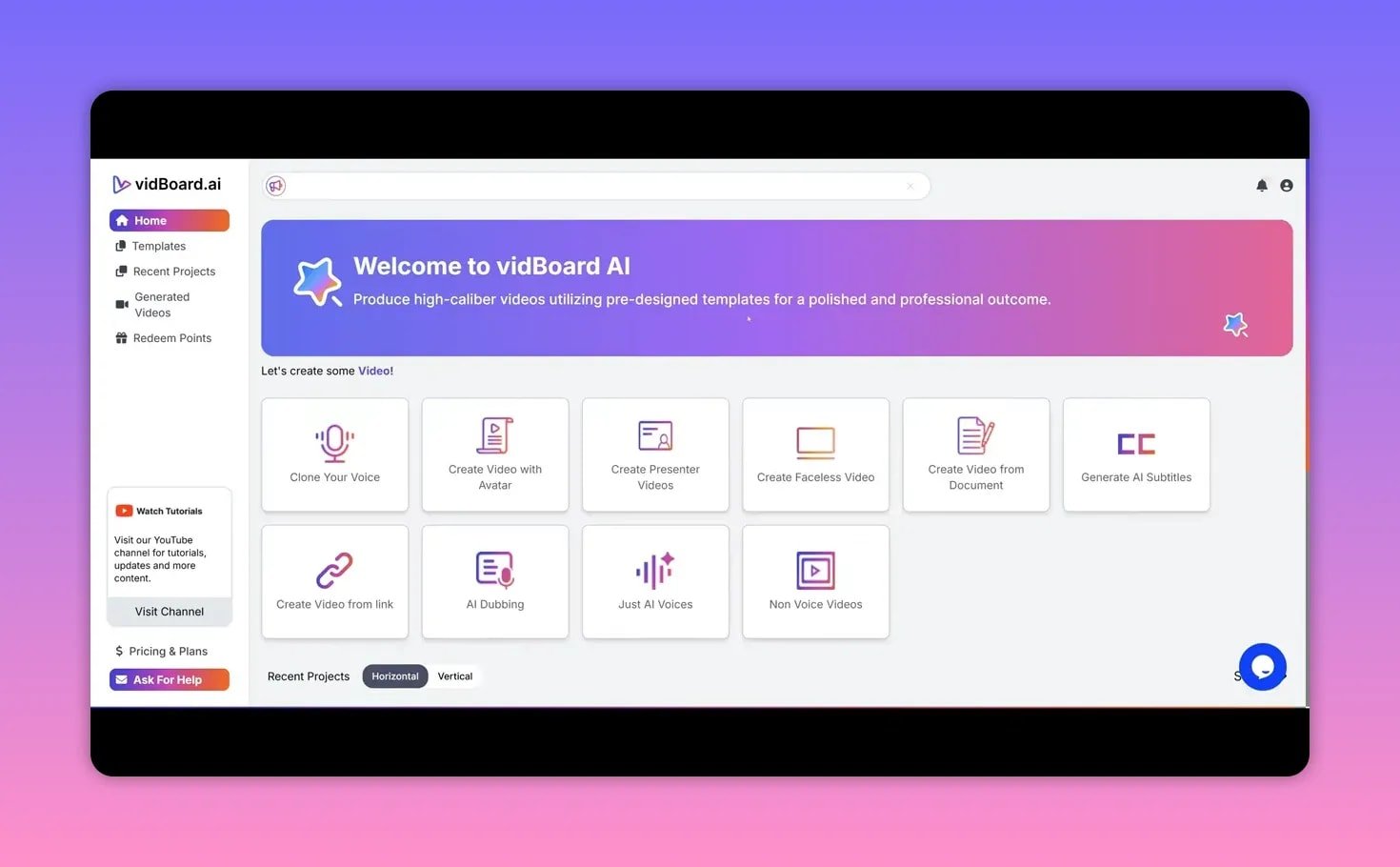
Signing in lands you in a clean dashboard with quick access to templates, recent projects, generated videos, and a coupon area. Generated videos are displayed in a straightforward list, making it easy to jump back into edits or re-download output.
A sample two-minute presentation demonstrates realistic avatar motion and accurate lip sync—especially noticeable in the head and hand gestures for pro avatars.
🎙️ Voice cloning: how it works and limits
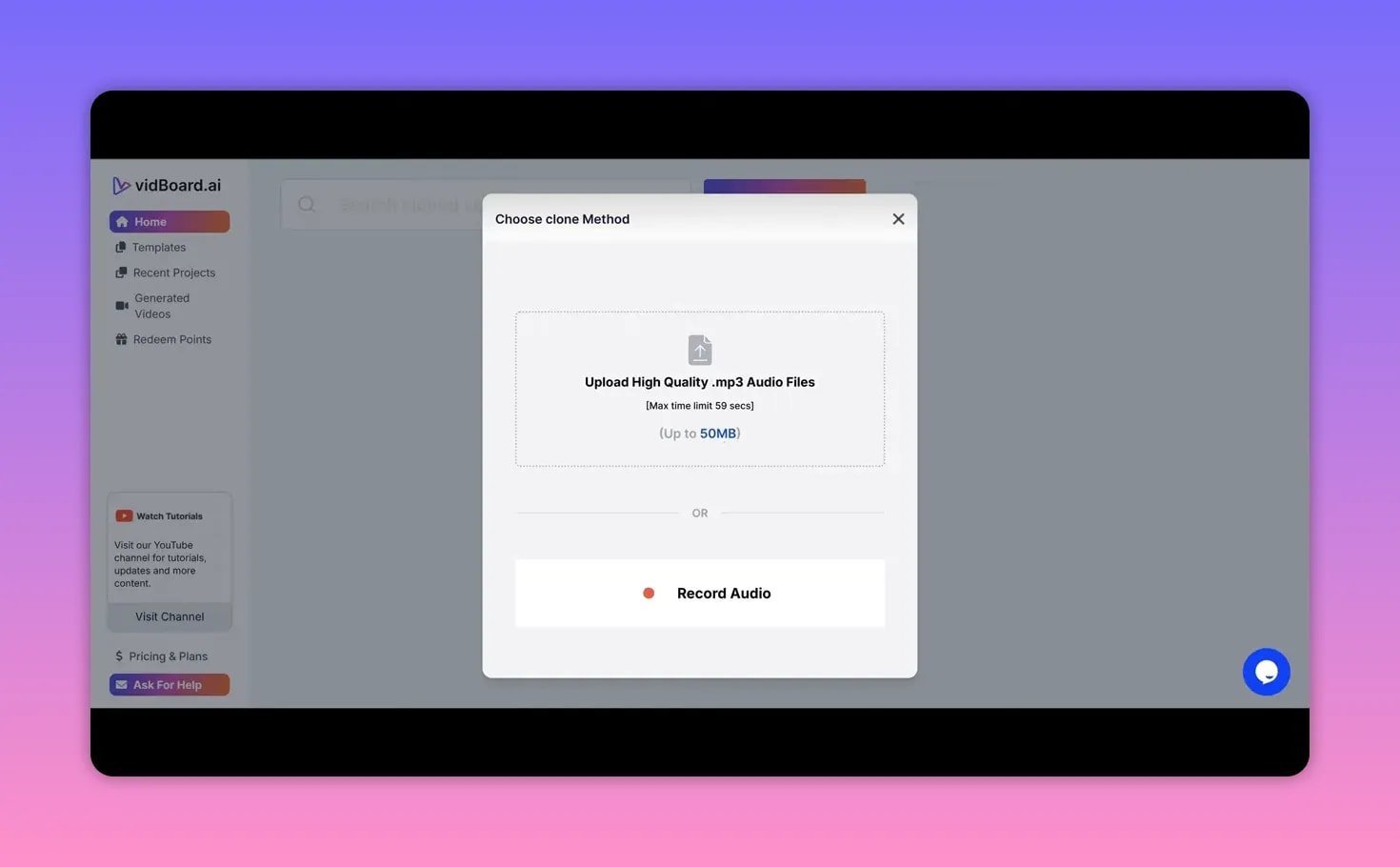
Voice cloning supports short uploads only: MP3 or mic recordings up to 59 seconds and 50 MB. Upload a sample, wait for the clone to process, and then apply it to any avatar-led presentation. The result can be impressively close to the source voice when the sample quality is good.
If voice cloning isn’t needed, vidBoard also provides a wide selection of synthetic voices via Microsoft Azure, 11 Labs, and OpenAI voices, with adjustable accents and age profiles.
✍️ Script generation with ChatGPT integration
Built-in AI can generate slide-by-slide scripts. Choose a topic, audience, tone, and number of slides (up to eight, with plans to increase). The AI produces concise slide scripts you can edit inline, then apply to the avatar.

This streamlines the content creation loop: ideation, generated script, avatar assignment, and audio generation—without toggling between multiple tools.
🧩 The editor: avatars, media, background, and music
The editor is drag-and-drop friendly and feels familiar if you’ve used tools like Canva. Key components:
- Avatars — a catalog of pre-made pro avatars with natural gestures; custom uploads available on higher tiers.
- Media sources — Google, Unsplash, Pexels and Pixabay integrated for quick image and video picks.
- Backgrounds and background videos — static or looping videos; some rendering hiccups may appear on heavy assets but refresh usually helps.
- Music — a built-in library and the option to upload your own track. Adjust volume so the music doesn’t overpower speech.
- Text and assets — fonts, stroke, opacity, icons and animations for polished slides.
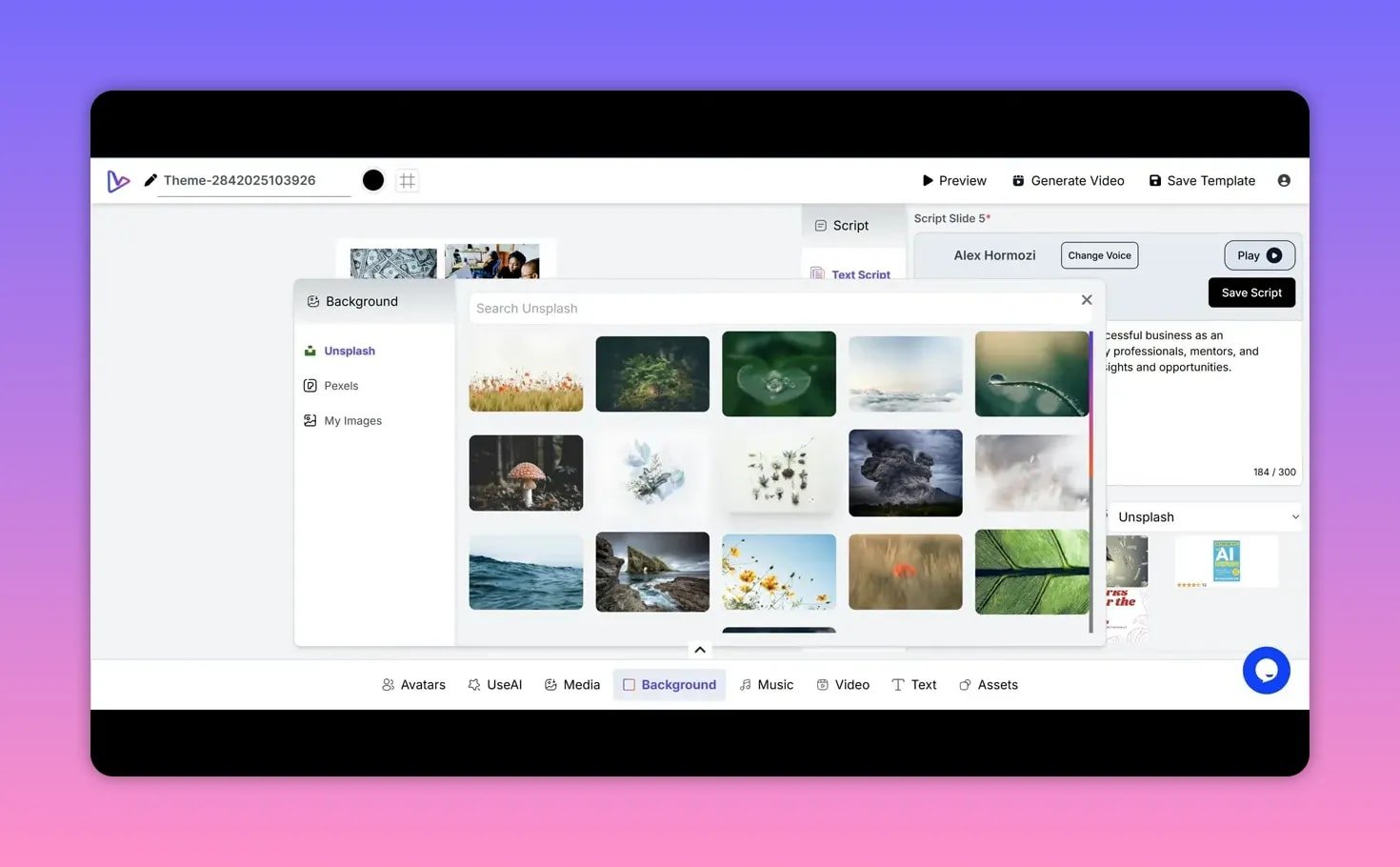
A useful editor touch is right-click options for ordering assets and simple entry-level transitions. One small missing convenience is a global “apply avatar position to all slides” button—currently you position avatars per slide.
📄 Create video from document or link
vidBoard can analyze a PDF or DOCX (up to 50 MB, max 10 pages) and auto-create slides from the text. It extracts the main points, proposes slide scripts, and suggests images from the chosen media source. This is ideal for turning short reports, product pages, or blog posts into slick presentation videos quickly.
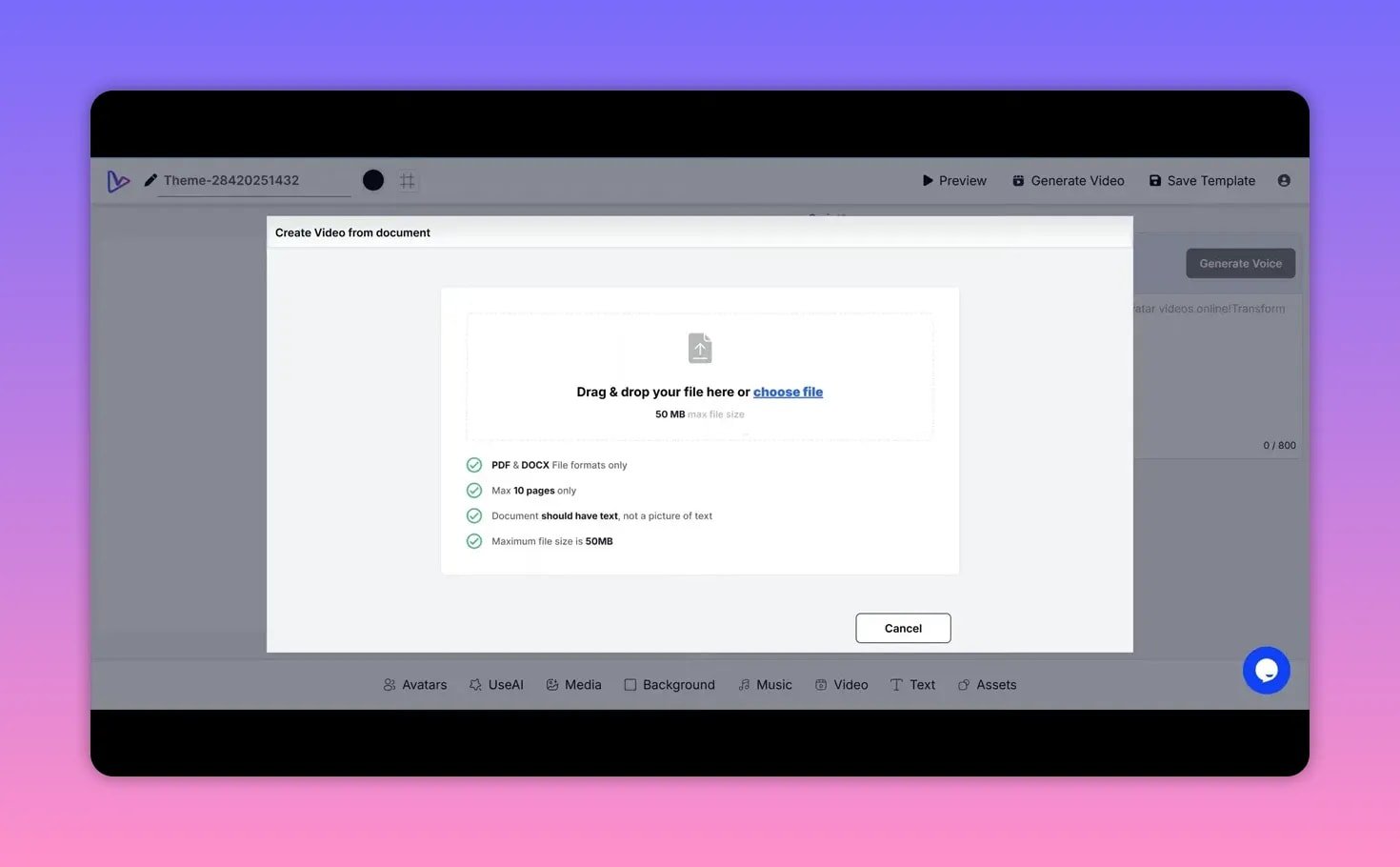
The link-to-video creator works similarly: paste a blog post or web page, pick image sources and slide count, and get a ready-made slide deck and narration that you can refine.
🌐 AI dubbing and subtitles
AI dubbing is set up for short-form clips: upload up to 30 MB and 60 seconds, select a target language, and vidBoard will produce a dubbed version. For example, English shorts can be dubbed into Spanish with convincing fluency and natural phrasing.
Subtitle generation supports many languages and multiple visual styles. It’s aimed at repurposing short content for social platforms where captions matter.
🖼️ Custom avatar uploads
Upload a JPG or PNG (max 1 MB, 500×500) to create a photo avatar. The platform gives clear rules: face-forward, neutral expression, plain background, and good lighting. Results can be hit or miss depending on the photo quality and background; pre-made avatars remain the most polished option.
When the photo meets the requirements, lip sync and basic head movement work well—useful for on-brand presentations without a camera setup.
✅ Strengths and things to watch
- Strengths: Fast end-to-end workflow, voice cloning that sounds very close to the original, easy script generation, multi-source media integration, AI dubbing for shorts, and responsive support.
- Limitations: Slide cap (eight currently), file size limits for uploads, custom avatar uploads require higher tiers, occasional background rendering delays, and short maximum durations for dubbing and cloning inputs.
🔭 Roadmap and support
The team is actively shipping new features: motion animation templates, GIF and asset integrations, an AI background remover, and e-commerce link features. Support is responsive via chat and email, and AppSumo buyers get a 60-day refund window if the tool isn’t a fit.

🧾 Final take
vidBoard AI is a practical tool for creators who want to produce avatar-led presentations and short-form videos fast. It shines when you need consistent, scripted content without shooting footage. If your workflow relies on turning articles, docs, or short audio into shareable videos, vidBoard reduces friction significantly—especially with voice cloning and dubbing features.
❓ Frequently asked questions
-
What file types and size limits apply to voice cloning?
Voice cloning accepts MP3 or real-time mic recordings up to 59 seconds and a maximum size of 50 megabytes.
-
Can I upload my own avatar image?
Yes. Custom avatar uploads are supported on higher tiers. Images must be JPG or PNG, 500×500 pixels, and under 1 megabyte, with a clear, face-forward photo and neutral background.
-
How many slides can AI generate for me?
The current limit is eight slides per auto-generated script. The team has indicated this limit will increase in future updates.
-
What languages does AI dubbing support?
AI dubbing supports many languages. The exact set is available inside the dubbing interface and includes common global languages like Spanish. The feature is designed for short clips up to 60 seconds.
-
Is there an option to create videos from articles or links?
Yes. Paste a blog post or document link, select image sources and slide count, and vidBoard will produce slide scripts and suggested imagery that you can customize.
📌 Quick tips for better results
- Use clean, high-quality audio when cloning voices for the best match.
- Choose pro avatars for more natural gestures and hand movement.
- Lower background music volume so it does not clash with avatar speech.
- When uploading a custom avatar, follow the photo rules precisely for best lip-sync and motion.
- Keep dubbing and cloned samples short and focused to stay within limits.