Last updated: August 6, 2026
Quick Answer: Free AI writing generators are browser-based or app-based tools that use large language models to draft, edit, or expand text on demand. In 2026, the best free options include ChatGPT (free tier), Google Gemini (free tier), Microsoft Copilot, and Writesonic’s free plan. Each has word or usage limits, but all can produce publish-ready content for blogs, emails, and social media without a paid subscription.
Key Takeaways
- Free AI writing generators use large language models to produce text from a short prompt, making them accessible to anyone with an internet connection.
- The top free tools in 2026 are ChatGPT (OpenAI), Google Gemini, Microsoft Copilot, Writesonic, and Copy.ai’s free tier.
- Free plans almost always cap daily words, generations, or features. Paid plans remove those limits and add brand voice controls.
- Free tools can be used for commercial content in most cases, but always read each platform’s terms of service before publishing.
- AI-generated text is not automatically plagiarism-free. It can reproduce phrasing from training data, so always run output through a separate plagiarism checker.
- Accuracy varies. AI generators can produce confident-sounding errors (“hallucinations”), so fact-check any claims before publishing.
- Academic institutions widely prohibit AI-generated submissions. Check your institution’s policy before using any AI tool for coursework.
- The single biggest mistake users make is publishing AI output without editing. Treat every draft as a starting point, not a finished product.
What Is an AI Writing Generator and How Does It Work
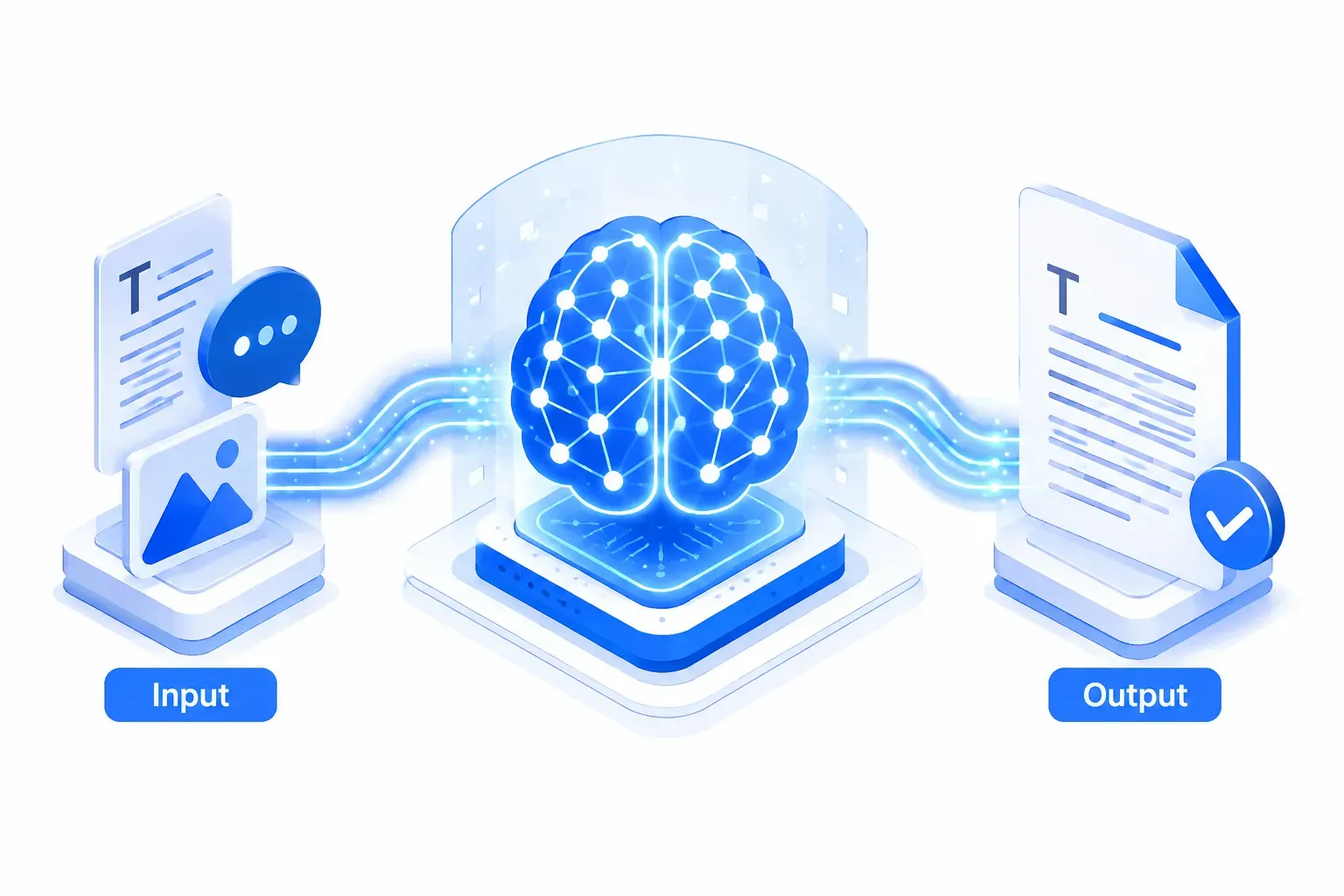
An AI writing generator is a software tool that takes a text prompt from a user and returns a written response using a large language model (LLM). The model predicts the most statistically likely next word, sentence, and paragraph based on patterns learned from billions of text examples during training.
How the process works in practice:
- You type a prompt (for example, “Write a 200-word product description for a wireless keyboard”).
- The model tokenizes your input and runs it through layers of neural network calculations.
- It returns a text output that matches the style, length, and topic you described.
- You review, edit, and publish.
The quality of the output depends heavily on prompt quality. Vague prompts produce generic text. Specific prompts that include tone, audience, word count, and purpose consistently produce better results.
For a broader look at how AI tools are reshaping content workflows, see this overview of AI productivity tools that transform work.
Best Free AI Writing Tools Compared in 2026
The best free AI writing tools in 2026 are ChatGPT, Google Gemini, Microsoft Copilot, Writesonic, and Copy.ai. Each offers a usable free tier, though limits vary significantly.
| Tool | Free Tier Limit | Best For | Key Limitation |
|---|---|---|---|
| ChatGPT (OpenAI) | Unlimited on GPT-3.5; GPT-4o with daily caps | General writing, brainstorming | GPT-4o usage throttled on free plan |
| Google Gemini | Generous daily queries | Research-backed drafts, Google Docs integration | Advanced model (Gemini Ultra) requires subscription |
| Microsoft Copilot | Free with Microsoft account | Office integration, business emails | Deep Office features require Microsoft 365 |
| Writesonic | ~10,000 words/month free | Blog posts, ad copy | Word cap resets monthly |
| Copy.ai | 2,000 words/month free | Short-form copy, social captions | Very low monthly word ceiling |
Choose ChatGPT if you want the most flexible general-purpose tool with no hard content-type restrictions. Choose Gemini if your workflow lives in Google Workspace. Choose Copilot if you write mostly in Microsoft Word or Outlook.
For writers focused on SEO-optimized content specifically, see this SEOpital review covering AI content that actually ranks and this Neuronwriter review covering the latest features.
Can I Use Free AI Writing Generators for Commercial Content
Yes, most free AI writing generators allow commercial use of their outputs, but the terms vary by platform. OpenAI’s terms of service, for example, grant users ownership of outputs for commercial purposes. Google Gemini and Microsoft Copilot have similar provisions, though both include clauses about not using the tools for harmful or deceptive content.
Before publishing commercially generated content:
- Read the platform’s Terms of Service, specifically the “output ownership” and “prohibited uses” sections.
- Avoid publishing AI-generated content that makes factual claims you have not verified.
- Disclose AI assistance where your industry, platform, or client relationship requires it.
“Most free AI writing tools grant you commercial rights to the output. The risk is not legal, it’s reputational. Unedited AI copy is often detectable and can undermine brand trust.”
How Accurate Are Free AI Writing Generators
Free AI writing generators are fluent but not reliably factual. They can produce confident-sounding text that contains errors, outdated information, or invented statistics. This phenomenon is commonly called “hallucination.”
Accuracy by content type:
- High accuracy: Grammar corrections, style rewrites, summarizing text you provide, generating creative fiction.
- Medium accuracy: General knowledge topics with well-documented facts (history, science basics).
- Low accuracy: Specific statistics, recent events, niche technical claims, legal or medical advice.
Always fact-check any specific claim an AI generator produces before publishing. For content that depends on verifiable data, use the AI for structure and phrasing, then fill in verified numbers yourself.
Free AI Writing Generator vs. Paid Subscription: Which Is Better
Free tiers are sufficient for occasional writers producing fewer than 10,000 words per month. Paid subscriptions are worth the cost for professionals who need higher output volume, brand voice controls, SEO integrations, or team collaboration features.
Key differences:
| Factor | Free Tier | Paid Plan |
|---|---|---|
| Word/generation limits | Yes, often strict | Removed or very high |
| Model quality | Older or capped model | Latest model, full access |
| Brand voice settings | Rarely available | Standard on most paid plans |
| SEO tools integration | Not included | Common on platforms like Writesonic, Jasper |
| Team seats | Single user only | Multi-user options |
Decision rule: If you are a solo blogger or small business owner testing AI writing for the first time, start with a free tier. Upgrade only when you hit the word cap consistently or need features like tone controls or direct CMS publishing.
What Are the Limitations of Free AI Writing Tools
Free AI writing tools have four core limitations: usage caps, model quality restrictions, lack of customization, and no memory of past sessions. These constraints make free tiers workable for light use but frustrating for high-volume or brand-specific content production.
Specific limitations to plan around:
- No long-term memory: Each session starts fresh. The tool does not remember your brand voice, past projects, or preferences.
- Generic tone: Without brand voice training, output often sounds like every other AI-generated piece.
- No real-time data: Most free tools have a knowledge cutoff and cannot access live web data unless specifically built with search integration (like Copilot or Gemini with web search enabled).
- Rate limits: Heavy use during peak hours can slow response times or trigger temporary blocks.
Can Free AI Writing Generators Detect Plagiarism
No. Free AI writing generators do not include plagiarism detection. They generate new text, but that text may closely resemble existing published content because the model was trained on it. To check for plagiarism, use a dedicated tool such as Copyscape, Grammarly’s plagiarism checker, or Turnitin.
Important distinction: AI-generated text is not automatically original. It can reproduce phrases, sentence structures, or even short passages that appear elsewhere online. Running AI output through a plagiarism checker before publishing is a standard best practice.
Best Free AI Writing Generator for Blog Posts
For blog posts, ChatGPT on its free tier and Writesonic’s free plan are the strongest options in 2026. ChatGPT handles long-form structure well and can produce full outlines, introductions, and section drafts. Writesonic’s free tier includes a dedicated “Blog Writer” template that formats output with headings automatically.
Workflow for a free-tier blog post:
- Write a detailed prompt: topic, target audience, word count, tone, and 3-5 key points to cover.
- Generate a full outline first, then expand each section individually to stay within word limits.
- Edit for accuracy, add original examples or data, and adjust tone to match your brand.
- Run through a grammar checker (Grammarly’s free tier works) before publishing.
For a structured approach to content planning that pairs well with AI drafting, see the only content brief template you need in 2026.
Free AI Writing Generator for Social Media Captions
Copy.ai and ChatGPT are the top free choices for social media captions. Copy.ai has purpose-built templates for Instagram, LinkedIn, Twitter/X, and Facebook, which saves significant prompt-writing time. ChatGPT produces strong captions when given a clear brief that includes platform, character limit, tone, and call to action.
Quick prompt formula for captions: “Write 3 Instagram captions for a [product/topic]. Audience: [describe]. Tone: [casual/professional/witty]. Include a call to action. Max 150 characters each.”
For teams managing social media at scale, pairing AI caption generation with a scheduling tool streamlines the workflow considerably. See this review of Mymarky AI social media management tool for a complementary solution.
Do Free AI Writing Generators Work for Academic Writing
Free AI writing generators should not be used to submit academic work as your own. Most universities and colleges now explicitly prohibit AI-generated submissions, and AI detection tools (such as Turnitin’s AI detector) are widely deployed. Submitting AI-generated text as original work is considered academic dishonesty at most institutions.
Legitimate academic uses of free AI tools:
- Brainstorming essay arguments or counterarguments.
- Getting feedback on your own draft’s clarity and structure.
- Summarizing long research papers to understand them faster (then read the original).
- Generating practice questions for exam prep.
Always check your institution’s specific AI policy before using any generator in an academic context.
Free AI Writing Generator for Email and Business Writing
Microsoft Copilot and ChatGPT are the best free options for email and business writing. Copilot integrates directly into Outlook on Microsoft 365 accounts, drafting replies and summarizing threads. ChatGPT produces polished business emails, proposals, and reports when given a clear context and desired outcome.
Common business writing tasks AI handles well:
- Cold outreach emails with a specific value proposition.
- Internal memos and status updates.
- Meeting follow-up summaries.
- Job application cover letters (as a draft starting point).
Common mistake: Sending AI-drafted emails without personalizing them. Recipients can often tell when an email is generic. Always add a specific detail that shows you know the recipient or their situation.
For email marketing specifically, see this Sendfox review as a best-priced email marketing tool for creators.
How to Choose the Right Free AI Writing Tool for Your Needs
The right free AI writing tool depends on your primary use case, your existing software stack, and how often you write. There is no single best tool for everyone.
Decision framework:
- You write mostly in Google Docs or need research integration: Use Google Gemini.
- You work in Microsoft Office or Outlook: Use Microsoft Copilot.
- You need maximum flexibility and the strongest general model: Use ChatGPT free tier.
- You write blog posts and want templates: Use Writesonic’s free plan.
- You focus on short-form copy and social media: Use Copy.ai’s free tier.
Edge case: If your content is SEO-focused and you need keyword integration alongside writing, a dedicated AI SEO writing tool will outperform a general generator. See the best AI-enhanced SEO and design tools in 2026 for options that combine writing with optimization.
Common Mistakes People Make With Free AI Writing Generators
The most common mistake is publishing AI output without editing. Other frequent errors include using vague prompts, ignoring factual accuracy, and over-relying on AI for content that requires a human perspective.
Top mistakes and how to fix them:
- Publishing first drafts: AI output is a starting point. Edit for accuracy, tone, and originality before publishing.
- Vague prompts: “Write a blog post about marketing” produces generic results. Specify audience, angle, word count, and tone.
- Skipping fact-checks: AI can fabricate statistics. Verify every specific claim independently.
- Ignoring brand voice: Generic AI copy sounds like everyone else. Add your own examples, opinions, and phrasing.
- Hitting word limits mid-project: Plan your usage across the month to avoid running out of free words at a critical moment.
Can Employers Tell If You Used an AI Writing Generator
Employers can often detect AI-generated writing, especially if they use AI detection tools or are familiar with the characteristic patterns of AI output. Common signals include overly uniform sentence length, excessive use of transitional phrases, a lack of specific examples, and a tone that is polished but impersonal.
AI detection tools (such as GPTZero, Originality.ai, and Turnitin’s AI detector) are increasingly used by employers in writing-intensive roles, content agencies, and publishing. These tools are not perfectly accurate, but they flag text with high statistical probability of AI origin.
Practical guidance: If your employer or client expects original writing, use AI to assist your process (brainstorming, outlining, editing) rather than to replace it. Heavily edited AI drafts that incorporate your own voice, specific examples, and verified facts are far less detectable and far more valuable.
FAQ
What is the best completely free AI writing generator in 2026? ChatGPT’s free tier (powered by GPT-3.5 with limited GPT-4o access) is the most capable fully free option in 2026. It handles the widest range of writing tasks with no mandatory subscription.
Do free AI writing tools have word limits? Yes. Most free tiers cap monthly output between 2,000 and 10,000 words, or limit daily queries. ChatGPT’s free tier on GPT-3.5 is the most generous exception, with no hard word count cap on that model.
Is AI-generated content bad for SEO? Not inherently. Search engines evaluate content quality, not origin. Well-edited, accurate, and helpful AI-assisted content can rank well. Thin, unedited AI content that adds no value tends to perform poorly.
Can I use ChatGPT for free without an account? OpenAI allows limited use of ChatGPT without logging in, though session history and some features require a free account.
Are free AI writing generators safe to use for confidential business content? Exercise caution. Most free tools process and may store your inputs to improve their models. Avoid entering sensitive client data, trade secrets, or personally identifiable information into any free AI tool unless you have reviewed its data privacy policy.
How do I improve the quality of AI-generated writing? Write detailed prompts. Include the target audience, desired tone, word count, key points to cover, and any phrases or style elements to avoid. The more context you provide, the better the output.
Which free AI writing tool is best for non-English languages? ChatGPT and Google Gemini both support dozens of languages with strong output quality. Gemini has a slight edge for languages with strong Google data representation.
Do free AI writing tools improve over time? Yes. The underlying models are updated periodically. Free tiers typically get access to improvements, though they may lag behind paid tiers that receive priority access to new model versions.
Can I use a free AI writing generator on a mobile device? Yes. ChatGPT, Google Gemini, and Microsoft Copilot all have mobile apps for iOS and Android. Most other tools work through mobile browsers.
What is the difference between an AI writing generator and a grammar checker like Grammarly? A grammar checker reviews and corrects text you have already written. An AI writing generator creates text from scratch based on your prompt. Many tools now combine both functions.
Conclusion
The Complete Guide to Free AI Writing Generators: Top Tools Compared in 2026 makes one thing clear: free tools have matured to the point where they are genuinely useful for everyday writing tasks. ChatGPT, Google Gemini, Microsoft Copilot, Writesonic, and Copy.ai each cover different use cases well, and none require a credit card to get started.
Actionable next steps:
- Pick one tool based on your primary use case using the decision framework above. Do not try five tools at once.
- Write your first detailed prompt today. Include audience, tone, word count, and purpose. Compare the output to a vague prompt and notice the difference.
- Edit every draft before publishing. Add one specific example, one verified data point, and one sentence in your own voice to every AI-generated piece.
- Check the terms of service for your chosen tool if you plan to publish commercially or share with clients.
- Pair your AI writing tool with an SEO or content planning workflow to maximize the value of every piece you produce.
Free AI writing generators are a starting point, not a shortcut. The writers who get the most from them treat the output as a rough draft and bring their own expertise, voice, and judgment to every final piece.