Last updated: August 6, 2026
Quick Answer: Yes, you can do meaningful SEO without spending a single dollar. The top 20 free SEO software tools that actually work, including Google Search Console, Ubersuggest, Ahrefs Webmaster Tools, and Screaming Frog (free tier), cover keyword research, technical audits, backlink analysis, and on-page checks. No credit card is required for any of them to get started.
Key Takeaways
- Google Search Console and Google Analytics 4 are the most powerful free SEO tools available and should be the foundation of any SEO workflow.
- Free SEO tools make money through freemium upsells, data limits, and premium plan upgrades, the free tier is a deliberate acquisition strategy, not a charity.
- The biggest limitations of free tools are data caps, slower crawl speeds, and missing competitor intelligence features.
- Beginners get the most value from Google Search Console, Ubersuggest, and AnswerThePublic for keyword discovery.
- Technical SEO audits can be run effectively for free using Screaming Frog (up to 500 URLs), Google Search Console, and PageSpeed Insights.
- Free tools that require no signup include Google PageSpeed Insights, Bing Webmaster Tools (partial), and SERP simulators.
- Paid tools offer deeper backlink databases, historical data, and API access, but free tools are sufficient for most small business and early-stage SEO needs.
- Using a combination of 3 to 5 free tools covers most SEO tasks better than relying on any single free platform.
- For small businesses, the free tiers of Ahrefs Webmaster Tools and Semrush (10 queries/day) provide competitive-level insights at zero cost.
- Consistency matters more than tool choice: running audits monthly and tracking keyword positions weekly produces better results than sporadic use of expensive software.
What Is the Difference Between Free and Paid SEO Tools
Free SEO tools provide core functionality with data or usage limits, while paid tools offer deeper databases, historical data, and automation at a monthly cost. The functional gap is real but smaller than most vendors suggest.
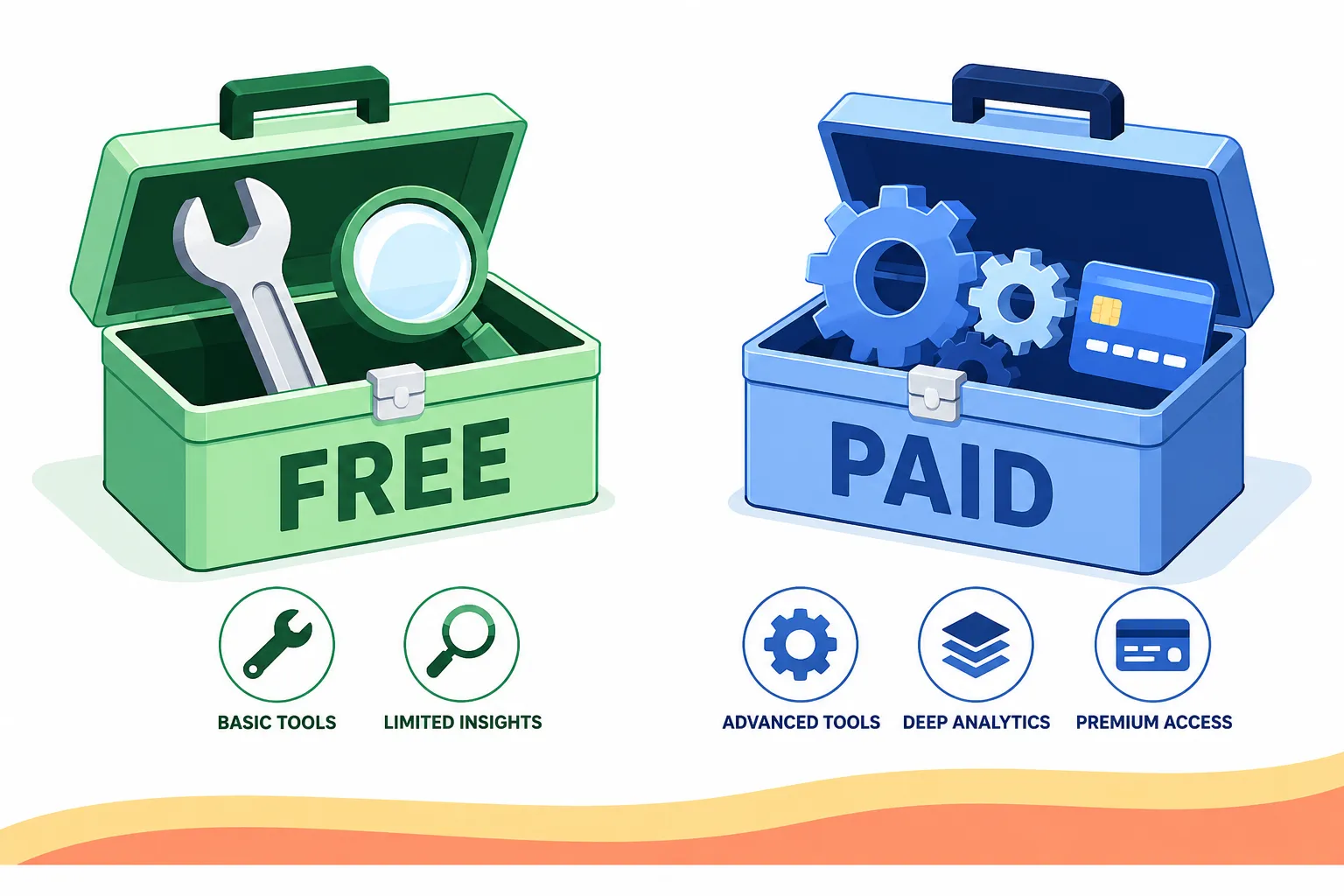
Here is a practical breakdown of where the gap matters most:
| Feature | Free Tools | Paid Tools (e.g., Ahrefs, Semrush) |
|---|---|---|
| Keyword data | Limited volume estimates | Accurate search volume + trends |
| Backlink database | Partial (Ahrefs WMT: your site only) | Full competitor backlink data |
| Site crawl limit | Up to 500 URLs (Screaming Frog free) | Unlimited or very high limits |
| Historical data | Rarely included | 12-24 months standard |
| API access | Almost never | Standard on paid plans |
| Competitor analysis | Basic or none | Core feature |
Choose free tools if: you run a small site (under 500 pages), you’re in the early stages of building organic traffic, or your budget is zero. Choose paid tools if: you manage multiple client sites, need competitor gap analysis, or rely on daily rank tracking at scale.
For a deeper look at whether you can replace expensive platforms entirely, see this guide on stopping Ahrefs payments with a cheaper workflow that works.
Can You Really Do SEO Without Spending Money
Absolutely. The top 20 free SEO software tools that actually work cover every core SEO discipline, keyword research, technical audits, on-page optimization, and performance tracking, without requiring a credit card.
Google alone provides three tools (Search Console, Analytics 4, and PageSpeed Insights) that together answer the most important SEO questions: which queries bring traffic, how users behave on the site, and how fast pages load. Thousands of sites rank on page one using only free tools.
The honest caveat: free tools struggle with competitive intelligence. If you need to know a competitor’s full backlink profile or their top-performing pages by traffic, you’ll hit walls quickly. But for most small business owners and solo creators, this gap rarely matters in the first 12 months of SEO work.
The Full List: Top 20 Free SEO Software Tools That Actually Work
These tools are grouped by primary use case. All are free to start with no credit card required.
Keyword Research Tools
- Google Search Console, Shows real queries driving impressions and clicks to your site. The single most accurate keyword data source available.
- Ubersuggest (free tier), 3 free searches per day. Provides keyword ideas, search volume estimates, and difficulty scores.
- AnswerThePublic (free tier), Visualizes question-based and preposition-based keyword clusters. Best for content ideation.
- Google Keyword Planner, Requires a Google Ads account (free to create, no spend needed). Gives search volume ranges and CPC data.
- Keyword Surfer (Chrome extension), Shows search volume directly in Google SERPs as you type. No login required.
- Wordtracker Scout (Chrome extension), Scrapes keyword frequency from any webpage. Useful for competitor content analysis.
For a method that finds keyword opportunities without any tools at all, see keyword research using three free data sources.
Technical SEO Audit Tools
- Screaming Frog SEO Spider (free tier), Crawls up to 500 URLs. Finds broken links, missing meta tags, duplicate content, and redirect chains.
- Google PageSpeed Insights, Scores Core Web Vitals and provides specific fix recommendations. No signup required.
- Ahrefs Webmaster Tools (free), Full site audit for your own verified domain. Includes backlink data, broken link detection, and on-page issues.
- Bing Webmaster Tools, Often overlooked. Provides crawl reports, keyword data, and SEO suggestions for Bing traffic.
- Sitebulb Lite (free tier), Visual crawl reports with prioritized issue lists. Good for clients who need readable audit outputs.
For a tool-by-tool look at technical SEO automation, the Clickrank on-page SEO automation review covers how automated tools handle on-page work.
On-Page and Content Optimization Tools
- Yoast SEO (free WordPress plugin), Checks readability, meta tags, and keyword usage in real time inside WordPress.
- Rank Math (free WordPress plugin), More feature-rich free tier than Yoast. Includes schema markup and Google Search Console integration.
- Hemingway Editor (free web version), Improves content readability by flagging complex sentences and passive voice.
- Google Trends, Shows seasonal keyword demand and geographic interest. No account required.
Backlink and Off-Page Tools
- Ahrefs Webmaster Tools (backlink module), Free for your own site. Shows referring domains, anchor text, and new/lost links.
- Moz Link Explorer (10 free queries/month), Checks Domain Authority and backlink counts for any URL.
- Google Search Console (Links report), Shows all external links Google has discovered pointing to your site.
Rank Tracking and SERP Tools
- Google Search Console (Performance report), Tracks average position for every query your site ranks for. Updated daily.
- Semrush (free tier, 10 queries/day), Provides keyword position tracking, domain overview, and basic competitor data within the daily limit.
Which Free SEO Tools Work Best for Beginners
Beginners get the most value from three tools: Google Search Console, Ubersuggest, and AnswerThePublic. These three together answer the core beginner questions, what am I already ranking for, what should I target next, and what questions does my audience actually ask.
Recommended beginner stack:
- Google Search Console: set up first, before anything else
- Ubersuggest: use the 3 free daily searches for new keyword ideas
- AnswerThePublic: use for content topic discovery once per content planning session
- Yoast or Rank Math: install on WordPress to guide on-page edits
Beginners should avoid starting with crawl tools like Screaming Frog. They produce large volumes of technical data that are hard to act on without context. Start with keyword and content tools, then add technical tools once the site has at least 20 published pages.
Best Free SEO Tools for Technical SEO Audits
Screaming Frog (free tier, up to 500 URLs), Google Search Console, and PageSpeed Insights form the most effective free technical audit stack. Together they surface the issues that most affect crawlability and Core Web Vitals scores.
Step-by-step free technical audit process:
- Run Screaming Frog on your domain. Export the list of 4xx errors, missing title tags, and duplicate meta descriptions.
- Open Google Search Console > Coverage report. Check for crawl errors and excluded pages.
- Run PageSpeed Insights on your top 5 landing pages. Note any LCP or CLS failures.
- Check Ahrefs Webmaster Tools > Site Audit for a prioritized issue list.
- Fix critical issues first: broken internal links, missing H1 tags, and slow-loading pages.
For a broader look at AI-powered SEO stacks for new sites, see this 7-tool AI SEO stack guide.
How Do Free SEO Tools Make Money If They’re Free
Free SEO tools use a freemium model: the free tier is a marketing channel designed to convert a percentage of users into paying subscribers. The free version is intentionally limited in ways that become frustrating as a site grows.
Common monetization methods:
- Data caps (Semrush: 10 queries/day free vs. unlimited paid)
- Feature gates (historical data, API access, white-label reports locked to paid tiers)
- Team seat limits (free plans are single-user only)
- Upsell prompts shown when you hit a limit
This model benefits users because the free tier is genuinely functional, the company needs it to be good enough to demonstrate value. The result is that free users get real tools, not demos.
What Are the Limitations of Free SEO Software
The main limitations of free SEO tools are data volume caps, lack of competitor intelligence, no historical trend data, and limited export options. These matter more as a site scales.
Specific limitations by category:
- Keyword research: Volume estimates are ranges, not exact figures. Competitive difficulty scores vary widely between free tools.
- Backlinks: Free tools only show your own site’s backlinks (Ahrefs WMT) or very limited competitor data (Moz, 10 queries/month).
- Crawl depth: Screaming Frog free stops at 500 URLs. Large sites need a paid crawler.
- Reporting: No white-label or scheduled reports on free tiers. Manual exports only.
- Support: Free tiers typically get community forum support, not direct help.
Common mistake: Treating free tool data as precise. Use free keyword volume estimates as directional signals, not exact numbers.
Free SEO Tools for Small Business Websites
Small business websites benefit most from Google Search Console, Ahrefs Webmaster Tools (free), and Rank Math. These three tools together cover local SEO signals, technical health, and on-page optimization without any cost.
For local SEO specifically, add:
- Google Business Profile (free), manages local search presence and reviews
- BrightLocal’s free SERP checker, checks local pack rankings by zip code
Small businesses with under 50 pages rarely need a paid SEO tool in the first year. The free tier of Ahrefs Webmaster Tools alone provides more actionable data than most small business owners can act on in a month.
For broader digital marketing context, see top digital marketing tools and WordPress plugin insights.
Do Free SEO Tools Actually Improve Rankings
Free SEO tools do not improve rankings by themselves, the actions taken based on tool data do. A site that consistently fixes crawl errors found by Screaming Frog, targets low-competition keywords found by Ubersuggest, and improves page speed based on PageSpeed Insights recommendations will see ranking improvements.
The tools are diagnostic instruments. Rankings improve when the site improves. Studies of ranking factors consistently show that page experience, content relevance, and backlink authority drive rankings, all of which can be measured and improved using free tools.
What actually moves rankings:
- Fixing technical errors surfaced by free crawlers
- Publishing content targeting keywords identified in Search Console
- Improving Core Web Vitals scores using PageSpeed Insights recommendations
- Building internal links using data from Screaming Frog’s link reports
How Often Should You Use Free SEO Tools
Run technical audits monthly, check keyword rankings weekly, and review Google Search Console performance data at least once per week. This cadence catches issues before they compound.
Recommended frequency by tool:
- Google Search Console: weekly (check for new crawl errors and traffic drops)
- Screaming Frog: monthly full crawl, or after any major site changes
- PageSpeed Insights: after each site update or theme change
- Ubersuggest / AnswerThePublic: during content planning sessions (monthly or quarterly)
- Ahrefs Webmaster Tools: bi-weekly backlink review
Daily use of free tools is rarely necessary unless a site is actively recovering from a penalty or a major technical issue.
Free SEO Tools That Don’t Require Signup
Several high-quality free SEO tools work without creating an account. These are useful for quick checks and one-off audits.
- Google PageSpeed Insights, enter any URL, get a full Core Web Vitals report instantly
- Keyword Surfer (Chrome extension), installs in one click, shows data in Google SERPs
- AnswerThePublic, limited free searches without an account
- SERP Robot, checks Google rankings for a keyword and URL, no login needed
- Robots.txt tester (various), paste a URL, see the robots.txt file and test directives
- Google Rich Results Test, tests structured data markup on any URL, no account required
- Bing Webmaster Tools, partial data available without full verification
These no-signup tools are best for quick competitive checks or auditing a site you don’t own.
How to Choose Between Different Free SEO Tools
Choose based on your primary SEO bottleneck, not on feature lists. If traffic is stagnant, start with keyword tools. If the site has indexing problems, start with technical tools.
Decision framework:
- “I don’t know what keywords to target”, start with Google Search Console + Ubersuggest
- “My pages aren’t getting indexed”, start with Google Search Console Coverage report + Screaming Frog
- “My site loads slowly”, start with PageSpeed Insights + Core Web Vitals report in Search Console
- “I want to write better content”, start with AnswerThePublic + Hemingway Editor
- “I need to track rankings”, start with Search Console Performance report + Semrush free tier
Avoid using more than 5 tools simultaneously. Tool overlap creates confusion and wastes time that should go into actually fixing issues.
For AI-enhanced alternatives to traditional SEO tools, see the best AI-enhanced SEO and design tools in 2026.
FAQ
Are free SEO tools accurate? Free tools provide directional accuracy, not precision. Google Search Console data is the most accurate because it comes directly from Google. Third-party free tools (Ubersuggest, Moz) use estimated data that can vary by 20-50% from actual search volumes.
Is Google Search Console really free? Yes. Google Search Console is completely free with no usage limits, no credit card required, and no paid tier. It is the most valuable free SEO tool available.
Can free SEO tools handle e-commerce sites? For small e-commerce sites (under 500 product pages), yes. Screaming Frog free tier, Search Console, and Rank Math cover the core needs. Larger catalogs require paid crawlers.
What is the best free SEO tool for beginners? Google Search Console is the best starting point for beginners. It shows exactly which queries bring traffic, which pages have issues, and which keywords are close to ranking higher, all with data sourced directly from Google.
Do free SEO tools work for local SEO? Yes. Google Business Profile (free), Google Search Console, and BrightLocal’s free SERP checker cover the core local SEO workflow. Paid tools add local citation tracking and review monitoring.
Is Screaming Frog free version worth using? Yes. The 500-URL free crawl is sufficient for most small and medium sites. It finds broken links, missing meta tags, duplicate content, and redirect chains, the most common technical SEO issues.
How many free SEO tools should I use? Three to five tools is the practical maximum for most users. More tools create data overload without adding proportional insight. A core stack of Search Console, Screaming Frog, and Ahrefs Webmaster Tools covers most needs.
Can free tools replace Ahrefs or Semrush entirely? For single-site owners focused on their own site’s health, yes. For agencies or users who need competitor backlink data, keyword gap analysis, or historical rank tracking, no. The competitor intelligence gap is the hardest to bridge with free tools.
Are there free SEO tools for YouTube? Yes. YouTube Studio provides free keyword and analytics data. For more advanced YouTube SEO, see this guide on mastering YouTube SEO with vidIQ tools.
What free tool is best for checking backlinks? Ahrefs Webmaster Tools (free) is the best free backlink checker for your own verified site. For checking competitor backlinks, Moz Link Explorer offers 10 free queries per month.
Do I need to pay for SEO tools to rank on Google? No. Many sites rank on page one using only free tools. Paid tools accelerate the process and provide competitive intelligence, but they are not a requirement for ranking.
Is Semrush free tier useful? Yes, within limits. The 10 free queries per day allow for keyword research, a domain overview, and basic competitor checks. It is enough for weekly strategic reviews but not for daily monitoring.
Conclusion
The top 20 free SEO software tools that actually work cover every core SEO function without requiring a credit card. The most effective approach is to build a small, focused stack rather than collecting every free tool available.
Actionable next steps:
- Set up Google Search Console today if it is not already installed. Verify your site and review the Performance and Coverage reports.
- Install Ahrefs Webmaster Tools and run a full site audit. Address the top 10 issues by priority score.
- Add Rank Math or Yoast to your WordPress site for real-time on-page guidance.
- Run a Screaming Frog crawl monthly and fix broken links and missing meta tags before they accumulate.
- Use Ubersuggest or AnswerThePublic once per content planning cycle to identify new keyword opportunities.
Free tools are not a compromise. For most websites in 2026, they are the right choice, and the discipline to act on the data they provide matters far more than the price of the software.